How to Access Your GiftCardMall MyGift Balance and Fix Common Login Errors
- Visa Cards: Visit
mygift.giftcardmall.com - Mastercard Cards: Visit
mcgift.giftcardmall.com - Store/Partner Cards: Visit
merchantgiftcard.giftcardmall.com
Navigating the digital landscape of prepaid financial products can often feel overly complicated, especially when corporate restructuring changes the web addresses printed on the back of physical cards. For years, consumers relied on the standard GiftCardMall portal to manage their prepaid Visa and Mastercard products. However, recent consolidations within the payment industry have shifted how these cards are managed online.
This comprehensive resource is designed to help you successfully locate the correct balance-checking portal, properly register your card for online purchases, and troubleshoot the notorious "white screen" error that frequently prevents users from accessing their funds. By understanding the underlying mechanics of how these prepaid networks operate, you can avoid common pitfalls like unexpected merchant declines and authorization holds.
Where Do I Go to Check My GiftCardMall MyGift Balance?
The primary source of confusion for many cardholders stems from a major corporate reorganization. The parent company that issues these cards, Blackhawk Network (BHN), has officially integrated the legacy GiftCardMall brand into their flagship consumer platform. According to the official rebrand announcement from Giftcards.com, entering the old root domain into your browser will now automatically redirect you to the new storefront.
However, the specific subdomains used for checking balances and activating cards remain active, provided you navigate to them directly. Because different payment networks require different processing gateways, you must select the URL that corresponds exactly to the logo printed on your physical card. Attempting to check a Mastercard balance on the Visa portal will result in an immediate error.
To access your account, identify your card type and use the corresponding direct link:
- For Prepaid Visa Cards
- Navigate directly to
https://mygift.giftcardmall.com/. This portal is exclusively configured to communicate with the Visa payment network to retrieve real-time ledger balances. - For Prepaid Mastercard Cards
- Navigate directly to
https://mcgift.giftcardmall.com/. Mastercard utilizes a different Bank Identification Number (BIN) routing system, necessitating this separate gateway. - For Private Label Merchant Cards
- Navigate directly to
https://merchantgiftcard.giftcardmall.com/. If your card features a specific store logo (or a group of specific restaurants) rather than a major credit card network logo, it operates on a closed-loop system managed through this specific partner portal.
vanillagift.com to manage those specific cards.

Image source: Giftcards.com
How to Activate and Register Your MyGift Card Online
While many prepaid cards are activated automatically by the cashier at the point of sale, online registration is a critical secondary step that many consumers overlook. Registering your card links your personal billing address to the 16-digit card number. This is not merely a formality; it is a functional requirement for participating in modern e-commerce.
When you attempt to make a purchase on websites like Amazon, PayPal, or standard retail storefronts, the payment processor performs an Address Verification System (AVS) check. The system compares the ZIP code you enter during checkout with the ZIP code on file with the card issuer. If you have not registered your card on the MyGift portal, the issuer has no ZIP code on file, the AVS check fails, and the merchant will decline the transaction—even if you have sufficient funds.
The Step-by-Step Registration Process
To ensure your card functions correctly for "Card Not Present" (online or telephone) transactions, follow this sequence:
- Locate Your Credentials: You will need the 16-digit primary account number (PAN) from the front of the card, along with the expiration date (MM/YY) and the 3-digit Card Verification Value (CVV) located on the back signature panel.
- Access the Correct Portal: Using the URL guide provided in the previous section, navigate to the specific Visa or Mastercard subdomain.
- Enter Card Details: Input your card information into the secure form. Ensure you are on a secure connection (look for the padlock icon in your browser's address bar) to protect your financial data.
- Assign a ZIP Code: Navigate to the "Register Card" or "Update Profile" section and input your current residential address. This address will now serve as your official billing address for all online checkout forms.
Image source: giftcardmall-mygift.io
Beyond facilitating online shopping, registration provides a layer of consumer protection. Under the framework established by the Credit CARD Act of 2009, gift card funds are legally required to remain valid for a minimum of five years from the date of purchase. Furthermore, official Visa guidelines indicate that issuers can often replace lost or stolen cards, but typically only if the card was previously registered to a specific individual's name and address. If an unregistered card is lost, the funds are generally considered irretrievable.
Why Is the MyGift Website Showing a White Screen?
One of the most pervasive issues reported by users attempting to access the MyGift portal is the "white screen of death." After entering the URL, the browser simply displays a blank white page, and the login form never loads. This is rarely a server outage; rather, it is almost always a client-side conflict involving browser security extensions or network routing.
The Blackhawk Network utilizes robust, enterprise-grade security scripts to monitor traffic on its balance-checking portals. Because these portals are frequent targets for automated botnets attempting to "brute force" card numbers to steal funds, the site employs aggressive session validation and device fingerprinting technologies. When your browser interferes with these scripts, the site halts the loading process entirely as a defensive measure.
The Ad-Blocker Conflict
The most common culprit behind the white screen is an active ad-blocker or privacy extension. Tools like uBlock Origin, AdBlock Plus, Privacy Badger, and even the built-in tracking protection in browsers like Brave or Firefox use filter lists (such as EasyList) to block third-party scripts. Unfortunately, these lists frequently misidentify the Blackhawk Network's security and analytics tokens as malicious trackers.
To resolve this, you must "whitelist" the portal. Click on your ad-blocker extension icon in your browser toolbar and select "Pause on this site" or "Disable for this domain." Once disabled, perform a hard refresh (Ctrl+F5 on Windows, Cmd+Shift+R on Mac) to force the browser to download the necessary scripts. The login form should immediately appear.
VPN and IP Address Flagging
If disabling your ad-blocker does not resolve the issue, your network connection is likely the problem. The security infrastructure protecting the MyGift portal actively monitors the reputation of incoming IP addresses. If you are using a Virtual Private Network (VPN)—such as NordVPN, ExpressVPN, or even Apple's iCloud Private Relay—your traffic is being routed through a data center IP address.
Because malicious actors frequently use data center IPs to mask their locations while running automated balance-checking scripts, the portal's firewall (often managed by services like Akamai or Cloudflare) will preemptively block these connections. The server simply drops the connection, resulting in a white screen or a "System Unavailable" error.
To fix this, temporarily disconnect your VPN. If you are on a mobile device, turning off Wi-Fi and using your cellular data connection (which provides a standard residential/mobile IP address) is often a highly effective way to bypass this security filter and access your balance.
Browser Cache and Redirection Loops
Finally, because the legacy GiftCardMall.com domain now redirects to Giftcards.com, your browser may have cached an outdated redirection path. If you previously visited the site during the migration period, your browser might be caught in a loop, rapidly bouncing between the two domains until it times out on a blank page. Clearing your browser's cookies and cache specifically for "giftcardmall" and "giftcards" will clear these stale routing instructions and allow the page to load cleanly.
What Is the Difference Between MyGift and Merchant Partner Cards?
A frequent point of frustration occurs when users attempt to check the balance of a card on the standard MyGift portal, only to receive an "Invalid Card Details" error despite entering the numbers perfectly. This usually happens because the user has a "Private Label Partner Card" rather than an open-loop Visa or Mastercard.
Understanding the distinction between open-loop and closed-loop payment networks is essential for managing your funds correctly.
Open-Loop Cards (Standard MyGift): These cards bear the logo of a major payment network (Visa or Mastercard). They are designed to be used almost anywhere that accepts those specific credit cards. Because they operate on global payment rails, their balances are managed through the primary mygift or mcgift subdomains.
Closed-Loop Cards (Merchant Partner): These cards do not feature a Visa or Mastercard logo. Instead, they feature the branding of a specific retailer, a family of restaurants, or a curated group of merchants (e.g., a "Happy Dining" card). These cards can only be processed by the specific point-of-sale systems of the participating merchants. Because they do not route through Visa or Mastercard, their data is housed on a completely separate server architecture.
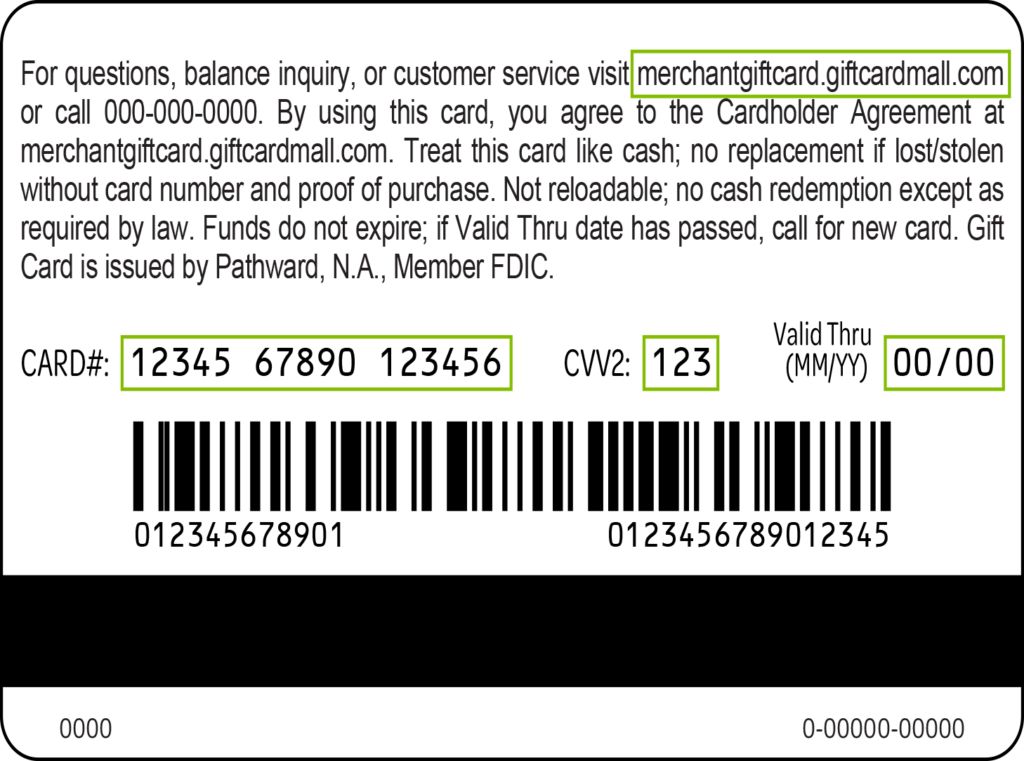
Image source: merchantgiftcard.giftcardmall.com
To ensure you are using the correct system, refer to the comparison table below. Always verify the exact URL printed in the fine print on the back of your physical card, as this is the definitive indicator of which database houses your funds.
| Card Characteristic | Network Type | Correct Web Portal | Where It Can Be Used |
|---|---|---|---|
| Features a Visa Logo | Open-Loop | mygift.giftcardmall.com |
Any U.S. merchant that accepts Visa debit. |
| Features a Mastercard Logo | Open-Loop | mcgift.giftcardmall.com |
Any U.S. merchant that accepts Mastercard debit. |
| Features Store/Restaurant Logos Only | Closed-Loop | merchantgiftcard.giftcardmall.com |
Only at the specific brands listed on the card. |
For more detailed information regarding closed-loop options, you can review the Blackhawk Network Merchant Portal documentation, which outlines the specific terms for private label partner cards.
Why Was My GiftCardMall Card Declined Despite Having a Balance?
It is a remarkably common scenario: you check your balance online, confirm you have $50 available, attempt to pay a $45 restaurant bill, and the card is declined. This occurs due to the mechanics of "pre-authorization holds," a standard practice in the payment processing industry designed to protect merchants in service-based industries.
When you swipe a card, the merchant's terminal sends an ISO 8583 payment message to the network to verify funds. However, in certain industries, the final total is not known at the time the card is swiped. To compensate, the terminal requests an authorization for an amount higher than the initial bill.
The 20% Tipping Rule at Restaurants and Salons
In industries where tipping is customary—such as restaurants, bars, hair salons, and spas—the merchant's point-of-sale system is programmed to automatically add a 20% "buffer" to the authorization request. This ensures that if you decide to write in a tip on the receipt, the card has sufficient funds to cover the final total.
For example, if your restaurant bill is $50, the terminal will actually ask the MyGift network to authorize $60 ($50 + 20%). If your gift card only has a balance of $55, the network will decline the transaction entirely because it cannot secure the full $60 hold. The terminal does not know you intend to leave a cash tip; it only follows its programmed logic.
The Solution: If your balance is close to the total bill, you must instruct the cashier to run the card for a specific, exact amount that is less than your total balance, and pay the remainder with another payment method.
Gas Station "Pay at the Pump" Issues
Automated fuel dispensers present a similar, but more extreme, authorization challenge. When you insert your card at the pump before pumping gas, the machine does not know if you intend to buy $10 or $100 worth of fuel. Consequently, the pump will place a pre-authorization hold on the card—typically ranging from $75 to $125, depending on the gas station's specific policies.
If your gift card balance is below this pre-authorization threshold, the pump will decline the card immediately. Even if the hold is successful, those funds are "frozen" and unavailable for other purchases until the actual transaction settles, which can take up to three business days.
The Solution: Never use a prepaid gift card directly at the pump. Always take the card inside to the cashier and prepay for an exact dollar amount (e.g., "Put $30 on pump number 4"). This bypasses the automated hold logic and charges the card for the precise amount requested.
Domestic Use Only Restrictions
Another frequent cause for declines is attempting to use the card for international transactions. The vast majority of GiftCardMall and MyGift products are strictly coded for "Domestic Use Only." This means they will only function at merchants physically located within the United States, and for online merchants whose payment processing gateways are based in the U.S.
If you attempt to purchase a digital product from a European software company, or order goods from an international marketplace, the transaction will be blocked by the network, regardless of your available balance.
How to Handle Disputes and Fraudulent Charges
If you review your transaction history on the MyGift portal and identify charges you did not authorize, immediate action is required. It is important to understand the limitations of the web portal: the website is a view-only interface. You cannot initiate a chargeback, cancel a pending transaction, or override a merchant decline through the web dashboard.
Prepaid gift cards are governed by different regulations than standard consumer credit cards. While credit cards offer robust fraud protections under the Truth in Lending Act, prepaid cards operate closer to the rules of the Electronic Fund Transfer Act (Reg E), and the specific protections vary based on whether the card was registered prior to the fraudulent event.
To dispute a charge, you must bypass the website and contact the customer service department directly using the toll-free number printed on the back of your physical card. According to community user guides and standard issuer protocols, you should be prepared to provide the following information to the representative:
- The full 16-digit card number and security code.
- The exact date and amount of the disputed transaction.
- The name of the merchant as it appears on your portal ledger.
- Confirmation of your registered billing address.
During a dispute investigation, the issuer may freeze the remaining funds on the card. Furthermore, it is highly recommended that you never throw away the physical plastic card until the balance is completely depleted and you are certain you will not need to return any purchased items. If you return an item to a store, the merchant is required to refund the money back to the original payment method. If you have discarded the gift card, you will not be able to access the refunded money.

Image source: Google Groups
Frequently Asked Questions
How do I check my balance without a PIN?
Can I add more money to my MyGift card?
What if my physical card expired but still has funds?
Why does the site say "System Unavailable"?
Can I use my MyGift card on Amazon or PayPal?
Is GiftCardMall a legitimate company?
giftcardmall.com or giftcards.com domains before entering your information.
The Bottom Line for Managing Your MyGift Card
While the corporate migration to Giftcards.com has introduced some navigational hurdles, accessing your funds remains straightforward once you understand the technical requirements of the portal. By following established best practices, you can ensure your transactions process smoothly and your funds remain secure.
- Verify your specific portal: Always match the logo on your card (Visa, Mastercard, or Merchant) to the corresponding subdomain to avoid login errors.
- Disable network interference: Pause ad-blockers and disconnect VPNs before attempting to load the balance-checking website to prevent the white screen error.
- Register immediately: Assign a ZIP code to your card via the online portal before attempting any e-commerce purchases to pass merchant AVS checks.
- Account for authorization holds: Remember the 20% buffer rule at restaurants and always pay the cashier directly at gas stations to avoid frozen funds.
- Retain the physical plastic: Keep your card in a safe place until the balance is zero and all potential return windows have closed.
Take a moment now to register your ZIP code on the official portal so your card is fully prepared for your next online purchase.