How to Convert ASCII Numbers to Letters and Symbols
ASCII (American Standard Code for Information Interchange) assigns a unique numerical value to every character on your keyboard. To convert an ASCII number to a letter, you can reference a standard 0–127 table where, for example, 65 equals 'A', 97 equals 'a', and 32 is a space. If you are writing software, you can automate this conversion using built-in functions like chr(65) in Python or String.fromCharCode(65) in JavaScript.
Whether you are a computer science student learning about data structures, a developer debugging a legacy database, or simply someone trying to type a special symbol on a laptop, understanding how to convert ASCII numbers to letters is a fundamental computing skill. Developed in the early 1960s, ASCII remains the bedrock of modern text encoding.
In this comprehensive reference, we will explore the complete standard table, the mathematical logic behind the character assignments, practical programming methods for conversion, and troubleshooting steps for common encoding errors.
The Complete ASCII Table for Numbers 0 through 127
The standard ASCII character set is a 7-bit code, meaning it can represent exactly 128 unique values (from 0 to 127). According to documentation from the Internet Assigned Numbers Authority (IANA), these 128 characters are divided into two main categories:
- Control Characters (0–31 and 127): These are non-printable characters originally used to control hardware devices like teletype printers. Examples include "Carriage Return" (13), "Line Feed" (10), and "Escape" (27).
- Printable Characters (32–126): These represent the visible text you see on a screen, including spaces, punctuation marks, numbers, and both uppercase and lowercase English letters.
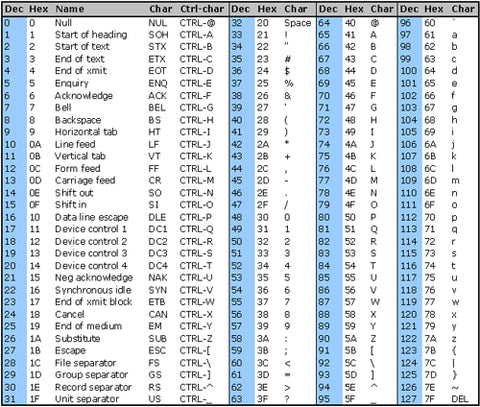
Image source: CommFront
Below is a highly referenced subset of the printable ASCII table, focusing on the most commonly used letters, numbers, and symbols. You can use this table to manually convert any standard decimal value back into its human-readable character.
| Decimal (Dec) | Hexadecimal (Hex) | Binary | Character / Symbol | Description |
|---|---|---|---|---|
| 32 | 20 | 00100000 | [Space] |
Spacebar |
| 33 | 21 | 00100001 | ! | Exclamation mark |
| 48 - 57 | 30 - 39 | 00110000 - 00111001 | 0 through 9 | Numeric digits |
| 64 | 40 | 01000000 | @ | At symbol |
| 65 | 41 | 01000001 | A | Uppercase A |
| 66 | 42 | 01000010 | B | Uppercase B |
| 90 | 5A | 01011010 | Z | Uppercase Z |
| 97 | 61 | 01100001 | a | Lowercase a |
| 98 | 62 | 01100010 | b | Lowercase b |
| 122 | 7A | 01111010 | z | Lowercase z |
| 126 | 7E | 01111110 | ~ | Tilde |
Why Does the ASCII System Use Specific Numbers for Letters?
To the untrained eye, the assignment of numbers to letters in the ASCII table might seem arbitrary. Why does 'A' start at 65 instead of 1? The answer lies in the mathematical elegance of binary logic and the hardware constraints of the 1960s.
The creators of ASCII designed the system so that computers could process text using the simplest possible mathematical operations. This design philosophy is most evident in two specific areas: the relationship between uppercase and lowercase letters, and the representation of numeric digits.
The 32-Bit Gap: Toggling Letter Case
If you look closely at the ASCII table, you will notice a consistent pattern: the lowercase version of any letter is exactly 32 numbers higher than its uppercase counterpart. For example, 'A' is 65, and 'a' is 97. 'B' is 66, and 'b' is 98.
This is not a coincidence. In binary, the number 32 is represented as 00100000. This means that the only difference between an uppercase letter and a lowercase letter in binary is the 6th bit (counting from the right). As noted by software engineer Guido Diepen, this allows programmers to toggle the case of any letter using a highly efficient bitwise XOR operation, rather than writing complex if/else statements.
- Binary for 'G' (71):
01000111 - Binary for 'g' (103):
01100111
By applying a bitwise XOR with 32, a computer can instantly flip the case of a character at the hardware level, saving valuable processing cycles in early computing environments.
Integer Extraction from ASCII Digits
Another clever design choice involves the numeric digits 0 through 9, which are assigned the ASCII values 48 through 57. In binary, the number 48 is 00110000. If you look at the last four bits of the ASCII values for digits, they perfectly match the actual integer value they represent.
For instance, the ASCII character '5' has a decimal value of 53, which is 00110101 in binary. The last four bits (0101) equal the integer 5. Developers can extract the true integer value from an ASCII character simply by applying a bitwise AND operation with 15 (00001111).
How to Convert ASCII Numbers to Letters in Your Code
While manual tables are useful for quick reference, converting ASCII numbers to letters is typically handled programmatically. Every major programming language includes built-in functions to translate between integer values and character strings.
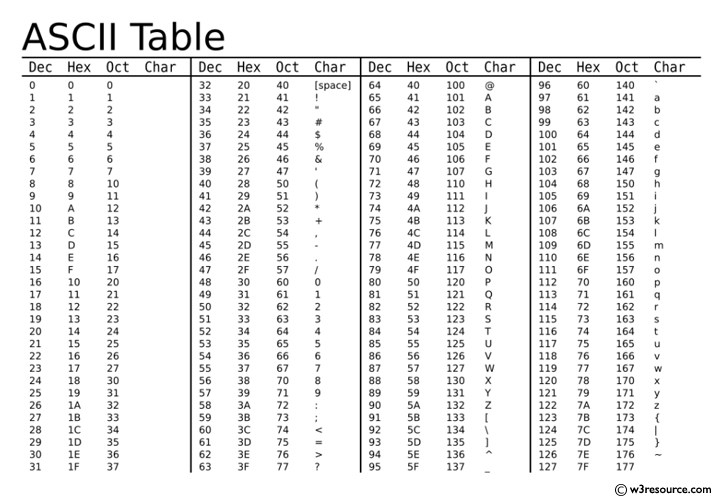
Image source: w3resource
Converting ASCII in Python Using the chr Function
Python makes character encoding exceptionally straightforward. To convert an ASCII integer into a string character, you use the built-in chr() function. To perform the reverse operation (letter to number), you use the ord() function.
# Convert ASCII number to letter
ascii_number = 65
letter = chr(ascii_number)
print(letter)  # Output: A

# Convert letter to ASCII number
char = 'z'
number = ord(char)
print(number)  # Output: 122
It is important to note that Python's chr() function actually supports the full Unicode range, not just standard ASCII. If you pass a number greater than 127, Python will return the corresponding Unicode character.
How to Use JavaScript to Turn ASCII Codes into Strings
In JavaScript, the method for converting numbers to letters is attached to the global String object. You use String.fromCharCode() to generate text from ASCII values.
// Convert a single ASCII number
let letter = String.fromCharCode(72);
console.log(letter); // Output: "H"

// Convert multiple ASCII numbers into a word
let word = String.fromCharCode(72, 101, 108, 108, 111);
console.log(word); // Output: "Hello"
fromCharCode(). The function expects individual integer arguments, not an array object. To fix this, use the ES6 spread operator: String.fromCharCode(...myArray).
C++ and Java Conversion Methods
In strongly typed languages like C++ and Java, characters and integers are closely related at the memory level. You can often convert between them simply by casting the variable type.
// Java Example
int asciiVal = 65;
char letter = (char) asciiVal;
System.out.println(letter); // Output: A
How to Use Alt Codes to Type ASCII Characters Manually
If you are writing a document and need to insert an ASCII character that isn't readily available on your keyboard (such as the tilde ~ or certain extended symbols), you can use "Alt codes" on Windows operating systems.
The process is simple in theory: hold down the Alt key, type the decimal ASCII number, and release the Alt key. However, many users encounter frustration when this method fails to produce the desired character.
According to documentation from The ASCII Code reference site, there is a strict hardware requirement for this to work: You must use the Numeric Keypad.
Alt key on your keyboard.
Alt key. The character will appear.
For laptop users without a dedicated numeric keypad, this process can be difficult. Some laptops offer a hidden numpad accessible via the Fn (Function) key, while others require the use of the Windows Character Map utility instead.
What Is the Difference Between Standard and Extended ASCII?
When discussing ASCII, it is crucial to distinguish between the original standard and later expansions. Standard ASCII is strictly a 7-bit system covering values 0 through 127. Because early computers processed data in 8-bit bytes, there was one bit left over (allowing for values 128 through 255).
Computer manufacturers quickly realized they could use these extra 128 slots to represent additional characters, such as accented letters (é, ñ), currency symbols (£, ¥), and line-drawing characters. This range (128–255) became known as Extended ASCII.
However, Extended ASCII introduces a significant complication: it is not a single, universal standard.
Different manufacturers created different "Code Pages" for the extended range. For example:
- IBM Code Page 437: Used in original DOS machines, featuring many box-drawing characters used for early text-based user interfaces.
- Windows-1252: The standard used by early Windows operating systems, focusing heavily on Western European accented characters.
- ISO-8859-1: An international standard that heavily influenced the later development of Unicode.
Because there is no single standard for values 128–255, a text file created on an old IBM machine might display completely different characters when opened on a modern Windows PC, depending on which code page the software assumes is being used.
Why You Might See Gibberish Instead of Letters
If you are working with data streams, legacy hardware, or cross-platform text files, you may occasionally encounter "gibberish" text—a phenomenon formally known as Mojibake. Understanding how ASCII interacts with other encoding systems can help you troubleshoot these issues.
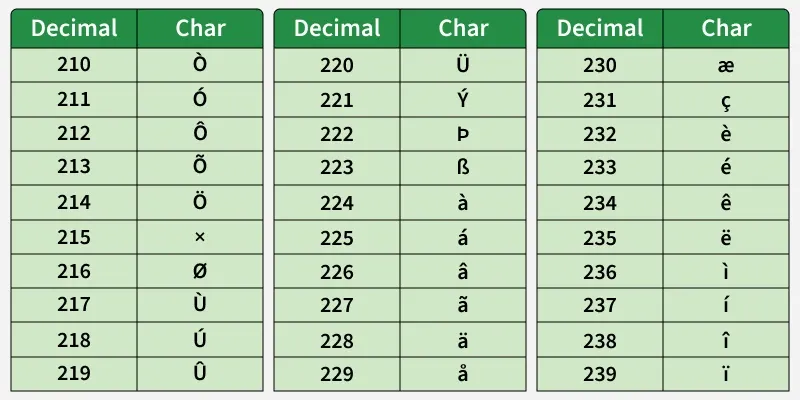
Image source: GeeksforGeeks
The Hex ASCII Trap
A common issue encountered by hardware developers and engineers working with serial communications is the "Hex ASCII" trap. As discussed on hardware engineering boards like the PICBASIC Pro Forum, legacy devices sometimes output numeric data by converting each digit into its ASCII equivalent, and then transmitting that ASCII value in hexadecimal format.
For example, if a sensor is trying to send the number "15":
- It splits the number into the characters '1' and '5'.
- It looks up the ASCII values: '1' is 49 (Hex 31), and '5' is 53 (Hex 35).
- It transmits the string "3135".
If your software reads "3135" and tries to interpret it as a single integer, your data will be wildly inaccurate. You must first parse the hex string back into ASCII characters, and then concatenate those characters into a numeric variable.
ASCII vs. Unicode (UTF-8)
Today, the dominant text encoding standard on the internet is UTF-8 (Unicode). Unicode was created to solve the limitations of Extended ASCII by providing a unique number for every character in every language on Earth, plus emojis.
Fortunately, the creators of UTF-8 made a brilliant design decision: backward compatibility with standard ASCII. The first 128 characters of UTF-8 are exactly identical to the 128 characters of standard ASCII. If you have a text file containing only standard English letters and numbers, it is simultaneously a valid ASCII file and a valid UTF-8 file.
Gibberish typically occurs when a file contains characters outside the 0–127 range, and the reading software guesses the wrong encoding standard (e.g., reading a UTF-8 file as Windows-1252).
Frequently Asked Questions
How do I convert ASCII numbers to letters in Python?
You can convert an ASCII number to a letter in Python using the built-in chr() function. For example, typing print(chr(65)) will output the uppercase letter 'A'. To do the reverse and find the number for a letter, use the ord() function, such as ord('A').
What is the ASCII code for a capital A?
The standard decimal ASCII code for a capital 'A' is 65. The lowercase 'a' is located 32 positions later in the table, at decimal value 97. This 32-number gap applies consistently across the entire English alphabet in the ASCII standard.
Is ASCII a 7-bit or 8-bit system?
Standard ASCII is strictly a 7-bit encoding system, meaning it defines exactly 128 characters (0 through 127). However, because modern computers process data in 8-bit bytes, ASCII characters are almost always stored using 8 bits, with the leading (most significant) bit set to zero.
Why is my Alt code not working on my laptop?
Alt codes require the use of a dedicated Numeric Keypad to function correctly. If you are holding the Alt key and typing numbers using the top row of your keyboard (above the QWERTY letters), the operating system will not register the command. Laptop users may need to use an external keyboard or the Windows Character Map.
What is the difference between ASCII and UTF-8?
ASCII is an older standard limited to 128 characters, primarily covering the English alphabet, numbers, and basic punctuation. UTF-8 is a modern Unicode standard capable of encoding over 140,000 characters from all global languages. However, UTF-8 is backward compatible; its first 128 characters are identical to ASCII.
Key Takeaways
Understanding how computers translate numerical values into readable text is a foundational skill for programming, debugging, and data management. While newer encoding standards have emerged, the original ASCII framework remains deeply embedded in modern computing architecture.
- Standard ASCII is limited to 0–127: It is a 7-bit code containing 95 printable characters and 33 control codes.
- Case toggling relies on a 32-bit gap: Uppercase and lowercase letters are separated by exactly 32, allowing for efficient bitwise logic operations.
- Use built-in code functions: Rely on
chr()in Python orString.fromCharCode()in JavaScript for programmatic conversions. - Alt codes require specific hardware: You must use a dedicated numeric keypad to manually type ASCII symbols via the Alt key method.
- Extended ASCII varies by system: Values from 128 to 255 are not universally standardized, which can lead to character display errors.
- UTF-8 is backward compatible: The first 128 characters of modern Unicode match the original ASCII table perfectly.