How to Find and Use COSCO Sailing Schedules for Global Shipments
To find a COSCO sailing schedule, navigate to the official COSCO elines portal and select one of three search methods: City Pairs (for port-to-port transit), Service (for specific trade routes), or Vessel (for tracking a specific ship's itinerary). Users can filter results by cargo type, haulage requirements, and departure windows up to three months in advance.
Navigating global ocean freight requires accurate, accessible data. As of 2026, COSCO Shipping Lines ranks among the top global carriers, boasting a fleet capacity exceeding 3 million TEUs. For logistics professionals, freight forwarders, and direct shippers, mastering the COSCO sailing schedule tools is a fundamental requirement for effective supply chain management.
However, extracting reliable data from enterprise shipping portals is rarely as simple as typing in a destination. Users frequently encounter login walls, technical errors, and discrepancies between estimated schedules and actual vessel performance. This article details exactly how to utilize the official COSCO scheduling tools, how to troubleshoot common platform errors, and how to cross-reference official data with third-party aggregators to ensure your cargo arrives on time.
Image source: Phaata
Where to Access the Official COSCO Sailing Schedule Tools
The primary source of truth for COSCO's operational data is the "elines" e-business portal. This centralized platform is designed to handle everything from initial schedule queries to final bill of lading documentation. When planning a shipment, users generally rely on three distinct search modalities provided by the platform.
The Three Primary Search Modalities
Depending on the information you already possess about your shipment, you will choose one of the following search paths:
- City Pairs (Port-to-Port): This is the most common starting point for new bookings. You input the origin port and the destination port to see all available upcoming voyages connecting those two locations.
- Service Route: If you are familiar with specific trade lanes (such as the AEU1 service connecting Asia to Northern Europe), you can search by the service code to view the entire rotation of vessels assigned to that loop.
- Vessel Name: If you have already been assigned a vessel or are tracking a specific ship (e.g., the Cosco Portugal), you can search by the vessel's name or IMO number to see its exact upcoming itinerary and port calls.
Timeframe Windows and Planning
The official COSCO elines portal allows users to project their shipping needs across flexible timeframes. The interface provides quick-select buttons for 1-week, 2-week, 3-week, and 4-week outlooks. For long-term supply chain planning, users can expand the search window to a maximum of three months. It is important to note that schedules projected further than four weeks out are highly susceptible to adjustments due to weather, port congestion, or blank sailings.
How to Search by City Pairs for Port-to-Port Transit Times
Searching by city pairs is the standard method for determining how and when your cargo can move from point A to point B. The process requires specific inputs to yield accurate results.
Inputting Origin and Destination
When entering locations into the elines portal, it is highly recommended to use standard UN/LOCODEs (United Nations Code for Trade and Transport Locations) rather than typing full city names, which can sometimes yield ambiguous results. For example, entering "CNSHG" for Shanghai or "USLAX" for Los Angeles ensures the system queries the exact maritime terminals rather than inland rail ramps with similar names.
Selecting Cargo Nature and Haulage Type
Before executing the search, the portal requires you to define the parameters of your shipment. These filters significantly alter the schedule results:
- Cargo Nature (GC vs. RF)
- You must specify whether you are shipping General Cargo (GC) or Reefer/Refrigerated cargo (RF). Not all vessels in a specific service loop have available reefer plugs. Selecting "RF" will filter out voyages that cannot accommodate temperature-controlled containers.
- Haulage Type (CY/CY vs. Door/Door)
- This determines the scope of the carrier's responsibility. CY/CY (Container Yard to Container Yard) means you are only searching for the ocean transit portion. Door/Door includes the estimated time for pre-carriage (trucking to the origin port) and on-carriage (trucking to the final destination). Selecting "Both" provides a comprehensive view of all options.
| Origin Port | Destination Port | Estimated Transit Time |
|---|---|---|
| Shanghai (CNSHG) | Tokyo (JPTYO) | ~3 to 4 Days |
| Singapore (SGSIN) | Auckland (NZAKL) | ~16 Days |
| Hong Kong (HKHKG) | Yantian (CNYTN) | ~8 to 12 Hours |
| Yantian (CNYTN) | Los Angeles (USLAX) | ~14 to 18 Days |
How to Find Schedules by Specific Vessel Name or Service Route
For logistics managers who manage high volumes of freight on established contracts, searching by specific services or vessels is often more efficient than searching by city pairs.
Service Route Analysis
Ocean carriers organize their ships into "services" or "loops"—a set rotation of ports that a group of vessels follows continuously. By using the Search by Service function, you can view the macro-level schedule for an entire trade lane. This is particularly useful when you need to know if a specific service loop is omitting a port next month due to congestion.
Vessel-Specific Lookups and Terminology
If your cargo is already booked, you will want to monitor the specific vessel. Entering the vessel name will display its past, current, and future port calls. When reading these schedules, understanding the terminology is critical:
- ETD (Estimated Time of Departure): The date and time the vessel is projected to leave the origin port.
- ETA (Estimated Time of Arrival): The date and time the vessel is projected to arrive at the destination port.
- Cut-off Times: Often displayed alongside the schedule, this indicates the absolute latest time a container can be gated into the terminal to make the voyage.
Image source: elines.coscoshipping.com
Why Your COSCO Schedule Might Not Match Reality
A common point of friction for shippers is the discrepancy between the published schedule and the actual movement of the cargo. It is vital to remember that the dates provided in the elines portal are estimates.
The Reliability Gap
Ocean freight is subject to immense variables: severe weather, labor strikes, terminal congestion, and mechanical issues. While COSCO updates its portal regularly, the published ETD and ETA often reflect the proforma schedule (the ideal, planned rotation) rather than real-time delays. According to historical data analysis from third-party logistics platforms, vessels on major East-West trades frequently experience deviations of 2 to 5 days from their original published schedules.
Relying solely on static carrier schedules without cross-referencing real-time vessel positions is a common pitfall in modern supply chain management. The published schedule tells you what was planned; satellite data tells you what is actually happening.
AIS Cross-Referencing
To bridge this reliability gap, experienced logistics professionals use Automatic Identification System (AIS) data. AIS is a tracking system that uses satellite and terrestrial receivers to pinpoint a ship's exact global coordinates, speed, and heading. By taking the vessel name from the COSCO schedule and plugging it into an AIS-enabled tracking platform (such as SeaVantage), shippers can verify if a vessel is actually approaching the origin port or if it is anchored offshore waiting for a berth.
Troubleshooting Common Issues with the COSCO elines Portal
The transition to digitized, enterprise-level shipping portals has brought immense data availability, but it has also introduced technical hurdles. Users frequently report encountering errors when trying to access COSCO schedules.
Bypassing the Unified Account Login Wall
In recent years, COSCO has pushed toward a "Unified Account" system, integrating schedules, bookings, and documentation into a single authenticated environment. Frequently, users attempting to run a simple schedule search are hit with a mandatory login prompt. If you do not have an account, this can halt your workflow. Often, this login wall is triggered by selecting advanced filters (like specific inland haulage rates) or searching too many times in a single session. Sticking to basic CY/CY port-to-port searches in an incognito browser window can sometimes bypass this requirement.
Fixing Technical and Regional Errors
The elines portal is built on modern web frameworks (specifically noted in developer communities as utilizing "homevue3" architecture). This means it relies heavily on client-side JavaScript. If you encounter a blank screen or a loading spinner that never resolves, the issue is likely local.
- JavaScript / Browser Compatibility
- Ensure you are using a fully updated version of Chrome or Edge. Strict ad-blockers or privacy extensions that disable JavaScript execution will break the Vue.js rendering of the schedule tables. Temporarily disabling these extensions for the elines domain usually resolves the issue.
- "Function not available in your region"
- Due to data privacy regulations or server load balancing, certain scheduling functions may be geofenced. If you receive this error, clearing your browser cache and cookies is the first step. If the error persists, utilizing a regional sub-portal (discussed in the next section) is the most effective workaround.
Regional Differences in COSCO Shipping Portals
While the main `.com` elines portal is intended for global use, COSCO maintains several regional websites that cater to specific markets. These regional portals often host localized schedule data and can serve as excellent alternatives when the main site is congested or experiencing technical difficulties.
Using COSCO Brasil for South American Trade
For shippers moving cargo between South America, Asia, and the Far East, the COSCO Brasil portal is a highly valuable resource. This dedicated site often provides faster access to localized sailing schedules and regional customer service contacts. Because it handles a fraction of the traffic of the global site, it is less prone to timeouts during peak business hours.
Downloadable Long-Term Schedules
Another distinct advantage of regional portals is the availability of static, downloadable schedules. While the main elines site focuses on dynamic, database-driven searches, regional sites often publish PDF or Excel versions of their long-term service rotations. These documents are incredibly useful for high-level quarterly planning, allowing shippers to see the intended vessel rotation for the next several months at a glance.
Comparing COSCO Schedules with Third-Party Tools
While the official COSCO portal is the definitive source for the carrier's intended operations, many shippers prefer to use third-party schedule aggregators. Platforms like GoComet and BuyCo pull data directly from COSCO via API but layer additional analytics on top of the raw schedule.
Sustainability and CO2 Filtering
A significant limitation of the official COSCO schedule tool is the lack of environmental data. With the implementation of the EU Emissions Trading System (ETS) for maritime transport, shippers are now financially liable for the carbon footprint of their cargo entering European ports. Third-party tools analyze the specific vessel assigned to a COSCO schedule, calculate its fuel efficiency, and provide an estimated CO2 emission metric for the voyage. This allows shippers to choose the "greenest" or shortest route to minimize tax liabilities.
Multi-Carrier Views and Historical Reliability
Aggregators offer a distinct advantage by allowing users to compare a COSCO schedule side-by-side with schedules from competitors like Maersk or MSC. Furthermore, advanced platforms calculate a "Probability of Delay" based on how often a specific COSCO service has arrived late over the past year, providing a more realistic ETA than the official proforma schedule.
| Feature | Official COSCO elines | Third-Party Aggregators (e.g., BuyCo, GoComet) |
|---|---|---|
| Data Source | Direct Carrier Database | API Integration + AIS Data |
| Multi-Carrier Comparison | No (COSCO & Alliance only) | Yes (All major carriers) |
| Historical Reliability Metrics | No | Yes (Probability of Delay) |
| CO2 / Emissions Estimates | No | Yes (Vessel-specific calculations) |
| Cost | Free (Requires Login for advanced features) | Subscription / Freemium models |
How to Link Your Schedule to the Booking Workflow
Finding the right schedule is only the first step in the logistics lifecycle. Once a suitable voyage is identified, the data must be translated into an active booking.
From Schedule to Booking
Within the COSCO elines portal, users who are logged into their Unified Account can transition directly from the schedule search results to the booking interface. By clicking "Book" next to a specific voyage, the system automatically populates the vessel name, voyage number, origin, and destination into the draft booking request. This reduces manual data entry errors.
Allocation Management
A critical workflow step that the public schedule tool does not show is allocation management. Large shippers have pre-negotiated contracts that guarantee them a certain number of container slots (TEUs) per week on specific routes. When viewing a schedule, logistics managers must cross-reference the available sailings with their internal allocation dashboards. Booking cargo on a schedule where your weekly allocation is already exhausted significantly increases the risk of the cargo being "rolled" (left at the terminal for the next ship).
Tracking After Departure
Once the booking is confirmed and the cargo is loaded, the schedule tool's utility diminishes, and the focus shifts to cargo tracking. Using the Booking Number, Bill of Lading (BOL) number, or the Container Number, shippers can monitor the execution of the schedule they originally searched for, utilizing COSCO's tracking modules or the aforementioned AIS platforms.
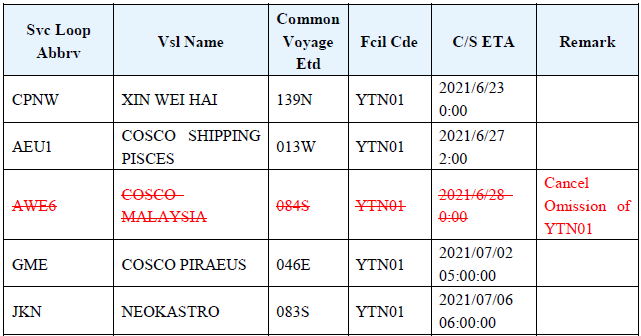
Image source: COSCO SHIPPING Lines
Frequently Asked Questions
How do I check the COSCO sailing schedule by vessel name?
To check by vessel name, navigate to the COSCO elines portal and select the 'Search by Vessel' tab. You will need to enter either the exact vessel name (e.g., Cosco Shipping Aries) or the vessel's unique IMO number. The system will then display the ship's current location and its projected port calls for the upcoming weeks.
Where can I download COSCO shipping schedules in PDF format?
While the main global elines portal focuses on dynamic, interactive searches, downloadable PDF or Excel schedules are typically found on COSCO's regional sub-portals (such as COSCO Europe or COSCO Brasil). Additionally, some long-term service rotations can be exported directly from the 'Search by Service' section of the main site.
Does COSCO offer a point-to-point schedule search without a login?
Yes, basic port-to-port (CY/CY) schedule searches can generally be performed without logging in. However, if you attempt to use advanced filters, search for inland door-to-door rates, or query the database excessively in a short period, the system will trigger a mandatory "Unified Account" login prompt to prevent data scraping.
What is the typical transit time from Shanghai to Los Angeles with COSCO?
The estimated transit time from Shanghai (CNSHG) to Los Angeles (USLAX) typically ranges from 14 to 18 days, depending on the specific service loop and weather conditions. It is important to note that this is the ocean transit time only and does not account for terminal dwell time or inland rail connections.
How do I handle a 'Function not available' error on the COSCO site?
This error is often related to browser caching, JavaScript issues, or regional geofencing. First, clear your browser's cache and cookies, and ensure no extensions are blocking JavaScript. If the error persists, try accessing the site via an incognito window or utilizing one of COSCO's regional mirror sites to bypass local server restrictions.
Can I filter COSCO schedules by carbon emissions?
Currently, the official COSCO elines portal does not offer native filtering for CO2 emissions or fuel efficiency. Shippers needing this data for EU ETS compliance or corporate sustainability reporting must use third-party schedule aggregators that calculate emissions based on the specific vessel assigned to the COSCO route.
Final Thoughts
Effectively utilizing COSCO sailing schedules requires more than just inputting two cities into a search bar. By understanding the nuances of the platform and integrating external data, shippers can build a more resilient supply chain.
- Verify official ETAs by cross-referencing the assigned vessel with real-time AIS satellite tracking data.
- Filter your searches accurately by specifying Cargo Nature (General vs. Reefer) to avoid booking incompatible voyages.
- Utilize regional portals like COSCO Brasil if the main global site is experiencing heavy traffic or technical errors.
- Cross-reference your chosen schedule with your internal contract allocations to prevent cargo from being rolled at the terminal.
- Monitor historical reliability using third-party aggregators to account for the "reliability gap" in published proforma schedules.