How to Find and Verify Permanently Closed Businesses Near You
To find permanently closed businesses in your area, you cannot rely on standard Google Maps searches, as Google actively hides closed locations to maintain relevance for general consumers. Instead, use the Google Search "Dorking" method (searching "Permanently Closed" site:https://www.google.com/maps/ [Your City]), consult your state's Secretary of State business entity search for "Inactive" statuses, or use specialized data aggregation tools like ClosedPlaces or Targetron to generate comprehensive lists.
Whether you are a commercial real estate investor hunting for second-generation restaurant space, a B2B sales representative trying to clean up a decaying lead list, or simply a local resident wondering what happened to your favorite neighborhood diner, tracking down permanently closed businesses is a surprisingly complex task. As of 2026, the digital landscape is designed to highlight what is open and active, actively burying data about commercial failures.
This comprehensive resource will walk you through the technical workarounds, official government databases, and specialized tools required to uncover hidden commercial vacancies and verify business closures with absolute certainty.
Why Are You Searching for Closed Businesses?
The methods you use to find closed businesses depend entirely on your end goal. The data required by a real estate developer is vastly different from the data needed by a software sales team. Generally, searchers fall into one of three distinct profiles:
The Goal: Finding "second-generation" commercial space.
Building out a restaurant from an empty shell can cost upwards of $300,000. Investors look for recently closed restaurants to inherit expensive infrastructure like commercial hoods, grease traps, and walk-in freezers at a fraction of the cost. They need highly localized, recent closure data.
The Goal: Lead list hygiene and competitor analysis.
Sales teams waste countless hours calling disconnected numbers and emailing dead domains. By cross-referencing their CRM with a list of recently closed businesses, they can purge dead leads. Alternatively, they track competitor client closures to identify market shifts.
The Goal: Historical tracking and community news.
Local journalists, historians, and residents often track neighborhood churn to understand economic trends. They are typically looking for the "why" behind a closure—whether it was a concept failure, a rent hike, or an owner retirement.
How to Find Permanently Closed Locations on Google Maps
If you open the Google Maps app and type "closed businesses near me," you will likely be shown a list of businesses that are currently closed for the day (e.g., outside of operating hours), rather than businesses that have permanently shut down. According to search algorithm analysts, Google purposely removes permanently closed locations from standard search results to ensure "relevance" for general users.
However, the data still exists in Google's backend. To access it, you must bypass the Maps interface and use a technique known as "Google Dorking" (using advanced search operators) directly in the main Google Search engine.
Open standard Google Search (not Maps) and type the following exact string, including the quotation marks:
"Permanently Closed" site:https://www.google.com/maps/ "Chicago"
This forces Google to search its indexed Maps URLs for pages that contain the specific red "Permanently Closed" banner text within the specified city limits.
Image source: Targetron
While this method ranks among the top free ways to find closures, it has limitations. Community members on forums like Reddit's r/GoogleMaps frequently note that Google's index can be weeks or even months out of date. A business might have a "For Lease" sign in the window long before the digital map reflects the closure.
Why Some Saved Places Turn Into GPS Coordinates
A common frustration for users who maintain extensive "Saved Places" or "Starred" lists on Google Maps is watching a saved restaurant or store suddenly disappear, replaced only by a raw string of GPS coordinates (e.g., 34.0522° N, 118.2437° W).
This happens due to how Google manages its database. Every location is assigned a unique "Place ID." When a business is marked Permanently Closed, the listing usually remains visible via direct link for historical context. However, if the business is completely purged from the system—often because a new business has claimed the exact same address and requested the old listing be removed—the original Place ID is deleted. Your saved list, unable to find the ID, defaults to showing the last known latitude and longitude.
How to recover the lost data: If you have a list full of coordinates and want to know what businesses used to be there, copy the coordinates and paste them into the Internet Archive's Wayback Machine alongside a Google Maps URL. By viewing a snapshot of the map from two or three years prior, you can often identify the original business name, read its old reviews, and even view its former menu or pricing structure.
Top Tools for Tracking Local Business Closures
Relying on manual search operators is inefficient for users who need bulk data. Over the past few years, several specialized data aggregation platforms have emerged to fill the gap left by standard search engines. These tools scrape public records, social media signals, and mapping APIs to create comprehensive lists of defunct companies.
Two platforms consistently cited by B2B professionals and real estate analysts include:
- ClosedPlaces.com: This tool is highly regarded for its historical preservation. When a business closes, ClosedPlaces archives its original phone number, website URL, and aggregate review scores. This is vital for real estate investors trying to determine if a location suffered a "concept failure" (the food was bad) or a "location failure" (the corner is cursed with zero foot traffic).
- Targetron: Targetron stands out as a top choice for B2B sales teams. It focuses heavily on lead generation hygiene, allowing users to export bulk lists of closed businesses by NAICS code or geographic region to scrub their CRMs.
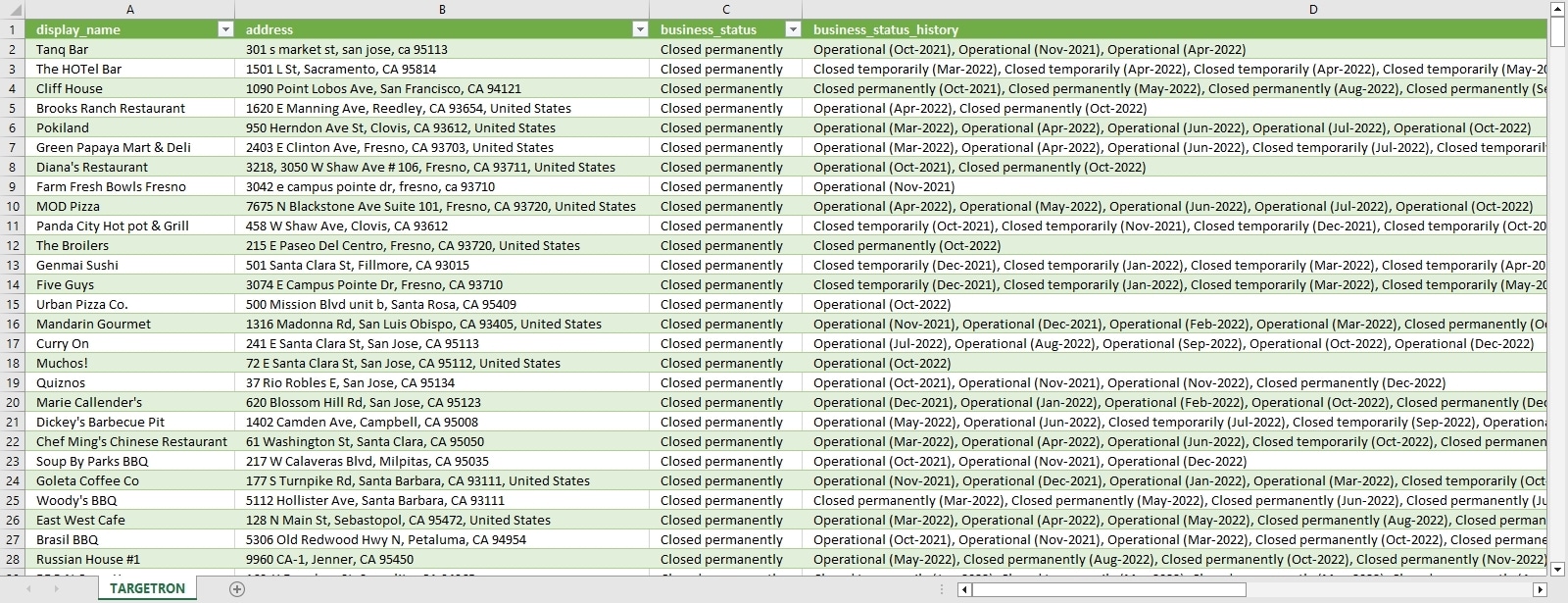
Image source: Targetron
| User Goal | Recommended Data Source | Key Benefit | Cost Level |
|---|---|---|---|
| Real Estate / Vacant Space | ClosedPlaces | Preserves historical reviews to analyze failure reasons. | Moderate |
| B2B Sales Lead Scrubbing | Targetron | Bulk export capabilities by industry/NAICS code. | Premium |
| Historical Research | Wayback Machine | Free access to old menus, pricing, and staff pages. | Free |
| Real-Time Emergency Closures | Local News / Twitter | Immediate updates on weather or localized events. | Free |
How to Use Government Records to Confirm a Business Status
A "Permanently Closed" label on a digital map is not legal proof of closure. Anyone can suggest an edit on Google Maps, and malicious competitors occasionally mark active businesses as closed. To verify a closure with absolute certainty, you must consult official government records.
A business is only officially closed in the eyes of the law when its registration is formally dissolved. You can check this through two primary avenues:
- Secretary of State (SOS) Filings: Every US state has an online business entity search portal managed by the Secretary of State. By searching the legal name of the LLC or Corporation, you can view its current standing. Look for statuses marked Inactive, Dissolved, or Forfeited. If the status is Active, the business legally exists, even if the physical storefront appears empty.
- City Open Data Portals: Many major municipalities offer transparent data portals. For example, the Los Angeles Open Data Portal features a specific dataset for "All Closed Businesses" registered with the Office of Finance. These databases can often be filtered by "Closed Date," providing a highly accurate timeline of commercial churn in specific zip codes.
Image source: Targetron
Why So Many Businesses Are Closing in 2026
To understand the volume of closed businesses you might find in your local search, it is helpful to contextualize the current economic landscape. Business closures are not always a sign of economic distress; they are often a natural part of the commercial lifecycle.
According to recent data, approximately 595,000 businesses close yearly in the United States. Furthermore, roughly 20% of new businesses fail within their first year of operation, and only about 34.5% survive past the ten-year mark.
However, the most significant driver of business closures in 2026 is a demographic shift known as the "Silver Tsunami." Tens of thousands of older business owners—primarily from the Baby Boomer generation—are reaching retirement age. Many of these small, local businesses (from dry cleaners to independent hardware stores) lack a formal succession plan. When the owner retires or passes away, the business simply closes its doors, creating a massive influx of available commercial real estate and secondary market equipment.
Regional trends also play a massive role. For instance, recent economic shifts and changing consumer habits led to over 10,000 restaurant closures in Texas alone, a statistic heavily tracked by local news outlets like KCEN TV in Waco and Do512 in Austin, which frequently publish "RIP" lists of beloved local spots.
A Comprehensive Step-by-Step Workflow to Verify if a Space Is Truly Vacant
If you are an expansion manager or real estate investor eyeing a property that appears closed, you cannot rely on a single data point. Use this multi-step verification workflow to ensure the space is truly available before contacting a landlord.
- The Digital Check: Start with Google Maps and social media. Look for the red closed banner. More importantly, check the business's Instagram or Facebook page. A sudden halt in posting 6-8 months ago is a strong indicator of a quiet closure.
- The Official Check: Run the business name through the state's Secretary of State portal. Confirm the LLC is marked as Dissolved or Inactive.
- The Historical Check: Use the Wayback Machine to view the business's website from a year ago. Note their peak pricing, menu items, or service offerings to gauge what the local market previously supported.
- The Physical Check: Visit the location. A digital map might be months behind reality. Look for physical indicators: a "For Lease" sign, mail piling up inside the door, utility shutoff notices taped to the window, or an interior that has been stripped of fixtures.
- The Zoning Check: Finally, check local municipal permit records. The business may be closed, but another entrepreneur might have already pulled building permits to renovate the space. If permits are active, the space is already spoken for.
How to Buy Equipment from Recently Closed Businesses
For many searchers, the intent behind finding a closed business is highly transactional. When a restaurant or industrial facility shuts down, their commercial assets—ovens, refrigeration units, CNC machines, or office furniture—must be liquidated, often at steep discounts.
If you are looking to purchase equipment from a recently closed business, contacting the former owner directly is rarely the best approach, as the assets may have already been seized by the landlord or a bank. Instead, track local commercial auction houses and liquidation websites. When a business officially dissolves, liquidators are typically contracted to clear the space within 30 to 60 days. Searching for "restaurant equipment liquidation [City]" will often yield the exact assets from the closed businesses you identified on Google Maps.
Troubleshooting Common Data Errors
When hunting for closed businesses, you will inevitably encounter conflicting data. Understanding how to interpret these discrepancies will save you significant time.
Google Maps frequently utilizes a Temporarily Closed tag. This is intended for businesses undergoing renovations, taking seasonal breaks, or dealing with short-term emergencies (like a burst pipe). However, many businesses that fail permanently are initially marked as "Temporarily Closed" by owners who hope to secure funding to reopen, but never do. If a business has carried a temporary closure tag for more than six months, it is highly probable that the closure is permanent.
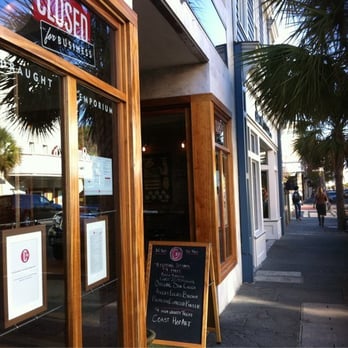
Image source: Yelp
Additionally, be aware of data latency. As noted by commercial real estate professionals, there is often a significant gap between the day a business stops paying rent and the day the digital ecosystem reflects the closure. Always prioritize physical site visits and official government filings over third-party map data.
Frequently Asked Questions
- How do I find a list of recently closed businesses in my city?
- The most reliable free method is to check your city's Open Data portal (if available) for "Inactive" business licenses. Alternatively, local news websites and alternative weeklies frequently publish "RIP" lists detailing major retail and restaurant closures in the area.
- How can I see only permanently closed locations on Google Maps?
- There is no native filter within the Google Maps app to show only closed businesses. You must use Google Search with the specific operator:
"Permanently Closed" site:https://www.google.com/maps/ [Your City]to force the search engine to reveal indexed closed listings. - What happens to a business's phone number after they close?
- Typically, the number is disconnected and eventually returned to the telecom provider's pool to be reassigned. However, specialized B2B tools like ClosedPlaces archive these original numbers, which is useful for researchers trying to track down former owners or analyze historical data.
- How do I find out why a specific business closed?
- Determining the cause of closure requires qualitative research. Check the business's final social media posts, read local news coverage, or analyze their historical review trends on Yelp or Google to see if there was a sudden drop in quality (concept failure) or complaints about parking/access (location failure).
- How do I find old businesses that don't exist anymore?
- If a business has been closed for years and its Place ID has been deleted from modern maps, your best resource is the Internet Archive's Wayback Machine. You can also consult historical business directories or digitized local Chamber of Commerce records at your municipal library.
Final Thoughts
Finding closed businesses requires moving beyond standard consumer search habits. Because major search engines prioritize active, open locations, uncovering commercial vacancies demands a mix of technical workarounds, official record-keeping, and boots-on-the-ground verification.
- Google Maps hides data: You must use site-specific search strings (Google Dorking) to bypass the algorithm and find hidden "Permanently Closed" banners.
- Maps are not legal proof: Always verify a closure by checking for an "Inactive" or "Dissolved" status on your state's Secretary of State portal.
- Use specialized tools for bulk data: Platforms like ClosedPlaces and Targetron are essential for B2B sales reps needing to scrub CRMs or investors analyzing market churn.
- Beware the "Temporarily Closed" tag: If a location has been marked temporarily closed for more than six months, it is usually a permanent exit.
- The Silver Tsunami is driving inventory: The retirement of Baby Boomer business owners is currently the largest catalyst for commercial space availability in 2026.