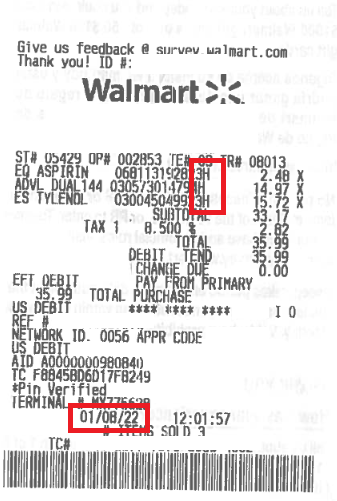
Image source: PeopleKeep Help Center
To understand your Walmart receipt, look at the letters and numbers surrounding the item price. The letter next to the price is the Tax Code: N means Non-taxable (usually groceries), X means standard Taxable, and O means a reduced local tax rate. The number at the far left of the item is the Department Number (e.g., 92 is Grocery). If you cannot identify a cryptic item name or a "STORES ONLY" charge, locate the TC# (Transaction Code) at the very bottom of the receipt and enter it into the Walmart Receipt Lookup tool to reveal the full product details.
Returning home from a shopping trip only to find a mystery charge labeled "SH VRB 67" or "STORES ONLY" on your receipt is a universally frustrating experience. When you are trying to balance your budget, split a grocery bill with a roommate, or verify that you were not double-charged at self-checkout, cryptic abbreviations make the process incredibly difficult.
Walmart's receipt system relies on legacy point-of-sale software that truncates product names to fit on narrow thermal paper. While this saves the company millions in paper costs annually, it leaves consumers guessing what they actually bought. Furthermore, official documentation rarely explains internal inventory codes, leaving shoppers to rely on trial and error.
This comprehensive resource serves as your master decoder ring. By understanding how to read department numbers, tax jurisdiction letters, and transaction barcodes, you can audit your purchases with complete accuracy, identify ghost scans, and retrieve full product names without ever having to drive back to the customer service desk.
To understand how to decode your receipt, it helps to understand why the receipt looks the way it does in the first place. The primary culprit behind confusing receipt line items is the physical limitation of thermal receipt printers combined with legacy inventory management systems.
A standard Walmart receipt printer allows for roughly 20 to 24 characters per line for the product description. However, modern products often have incredibly long names. A product officially listed in the inventory system as "Great Value 100 Count Large Surge White Trash Bags" simply cannot fit on the paper. To solve this, the point-of-sale (POS) system automatically strips out vowels, removes spaces, and abbreviates brand names, resulting in a line item that might read "100L SRG WHT."
Additionally, the system prioritizes internal inventory tracking over consumer readability. The POS system pulls the description directly from the manufacturer's Universal Product Code (UPC) database entry, which is often typed in by a vendor rather than a consumer-facing copywriter. If a vendor names their product "Shampoo Verbena 67oz," the receipt might truncate it to "SH VRB 67."
This creates a significant problem for consumers who are trying to audit their spending. When you purchase 40 items, remembering that "SH VRB 67" corresponds to the shampoo you bought three days ago is challenging. The frustration compounds when dealing with generic merchandise codes, which occur when an item's barcode is damaged and a cashier manually keys it into a broad category rather than a specific product profile.
By learning the structural anatomy of the receipt, you can bypass these confusing abbreviations entirely and use the numerical data—which is always accurate—to find exactly what you purchased.
Every Walmart receipt follows a strict, standardized layout. Knowing exactly where to look for specific data points is the first step in troubleshooting a mystery charge. The receipt is divided into three main sections: the header, the line items, and the footer.
At the very top of the receipt, beneath the Walmart logo, you will find the store's physical address and phone number. Directly below or beside this information is the Store Number. This is typically a 1- to 4-digit number (e.g., "Store #3451"). You will absolutely need this number if you plan to use the digital receipt lookup tool, as the system requires you to specify which location processed the transaction.
The middle section of the receipt contains your actual purchases. A single line item is packed with data, reading from left to right:
Below your subtotal and payment information lies the most important troubleshooting tool on the receipt: the TC# (Transaction Code). This is a 20-digit number printed just above the barcode at the very bottom of the paper. The TC# is a unique identifier for your specific checkout session. It encodes the date, time, register number, and transaction sequence. If you need to return an item, look up a lost receipt, or prove a purchase, the TC# is the ultimate source of truth.
One of the most common questions shoppers have when reviewing their receipts is why certain items have different letters next to their prices, and why the math at the bottom of the receipt shows multiple different tax rates (Tax 1, Tax 2, etc.). These letters are tax jurisdiction codes, and they explain exactly how local and state governments are taxing your purchases.
Because Walmart operates in thousands of different tax jurisdictions across the United States, their POS system uses a standardized letter system to categorize items based on local tax laws. According to internal documentation and tax compliance standards, here is the master decoder for those letters:
| Tax Letter | Meaning | Typical Items | Tax Applied |
|---|---|---|---|
| N | Non-Taxable | Unprepared groceries, fresh produce, OTC pharmacy items (in some states). | 0% |
| X | Standard Taxable | Electronics, clothing, household goods, cleaning supplies, toys. | Full State + Local Rate |
| O | Other / Reduced Rate | Varies heavily by state. Often used for items that are exempt from state tax but subject to local city tax. | Partial Rate |
| F | Food Tax | Groceries in states that tax food at a reduced rate (e.g., Illinois, Arkansas, Utah). | Reduced Food Rate |
| P | Pharmacy | Prescription medications and specific medical devices. | 0% (Exempt) |
| T | Taxable (Alternative) | Used interchangeably with 'X' in certain older regional POS systems. | Full State + Local Rate |
If you look at the bottom of your receipt, you might see your total tax broken down into multiple lines. This is where the jurisdiction logic comes into play. You are rarely paying just one flat "sales tax." Instead, you are paying a stack of different taxes levied by different levels of government.
Typically, Tax 1 represents the baseline State Sales Tax (for example, 6% in Florida). Tax 2 usually represents the County Sales Tax (perhaps an additional 1%). Tax 3 and Tax 4 represent City taxes or special district taxes (like a local transit authority or stadium tax).
This explains why the math can look confusing. An item marked with an "O" might be legally exempt from the State Tax (Tax 1) but still subject to the City Tax (Tax 3). Therefore, you cannot simply multiply your subtotal by your state's sales tax rate and expect it to match the receipt perfectly. The letters next to the items dictate exactly which of those four tax buckets the item falls into.
When a product abbreviation is completely illegible, the fastest way to figure out what you bought is to look at the Department Number. This is the 1- or 2-digit number printed on the far left of the line item, just before the product name.
Walmart organizes its massive inventory into specific numbered departments. While store layouts change, these internal accounting numbers remain remarkably consistent across the country. Here is a comprehensive list of the most common department numbers you will encounter on your receipt:
By cross-referencing the department number with the price, you can usually solve the mystery. A $50 charge in Dept 72 is likely a video game or accessory, while a $50 charge in Dept 92 is likely a bulk grocery item.
Even with a solid understanding of department numbers and tax codes, you may occasionally encounter line items that seem entirely fabricated. The most notorious of these is the "STORES ONLY" charge, which frequently causes panic among shoppers who believe they have been scammed or hacked.
If you see a line item that reads "STORES ONLY" (often associated with the UPC 810116123440), do not panic. This is not a fraudulent charge. In Walmart's inventory system, this specific code is used as a generic bucket for items that have not been properly categorized in the local store's database, or for specific types of generic household goods.
Community troubleshooting reveals that this code most frequently appears when purchasing generic home storage items (like plastic bins), seasonal clearance items, or items manufactured by third-party vendors that share a generic barcode block. Because the local store's server doesn't have a specific name attached to that barcode, it defaults to the "STORES ONLY" label. To figure out what it is, look at the price and the department number, and check your bags for an item matching that description that doesn't appear elsewhere on the receipt.
Another common mystery charge is "Site Merch" or "Generic MDSE" (Merchandise). These codes almost always indicate a manual entry by a cashier. If you brought an item to the register that was missing its barcode tag, the cashier likely asked for the price, typed it in manually, and assigned it to a generic department. Because the item wasn't scanned, the system has no way to print the actual product name.
With the rise of self-checkout kiosks, "ghost scans" have become a significant issue. A ghost scan occurs when the sensitive barcode scanner registers an item twice in rapid succession, or when it picks up the barcode of an item left behind by a previous customer. These often appear as duplicate lines on your receipt.
To protect yourself from ghost scans, you should perform a quick receipt audit before leaving the store vestibule. Check for any high-value items that appear twice, and verify that the total number of items listed at the bottom of the receipt matches the rough number of items in your bags. If you spot a ghost scan, take the receipt and your items directly to the customer service desk. They can review the security footage from the self-checkout terminal to verify that you only bagged one item and issue a refund.
If you have analyzed the department number and the tax code, and you still cannot figure out what a specific abbreviation means, it is time to use technology. The Transaction Code (TC#) at the bottom of your receipt is the key to unlocking the full, un-abbreviated digital record of your purchase.
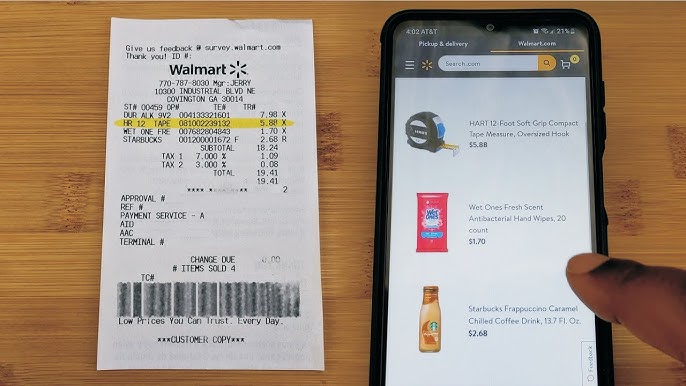
Walmart provides a public tool specifically designed to help customers find lost receipts and view full transaction details. Navigate to the Walmart Receipt Lookup website. You will need to enter the following information from your physical receipt:
Once submitted, the system will generate a digital version of your receipt. Unlike the physical thermal paper, the digital receipt often pulls the full web-store product title and includes thumbnail images of the items, instantly solving any abbreviation mysteries.
If the official lookup tool fails, or if you want a faster method, you can use a clever workaround within the Walmart mobile app. While the app is supposed to automatically sync your in-store purchases if you pay with a linked credit card, this feature frequently lags or fails entirely.
To force the app to reveal your items, open the Walmart app and tap the barcode scanner icon (usually located in the search bar at the top of the screen). Instead of scanning a product, point the camera at the square QR code or the long TC# barcode at the bottom of your physical receipt. This forces the app to manually ingest the transaction. Once scanned, the app will populate a list of your purchased items complete with high-resolution photos and full product names.
If a specific item is still showing up as a generic code even in the digital tools, you can perform a manual UPC search. Look at the 12-digit number printed directly below the item abbreviation on your physical receipt. Type this exact 12-digit number into the search bar on Walmart.com or a general search engine like Google. Because UPCs are universal, this will almost always pull up the exact manufacturer product page, revealing exactly what the item is.
Walmart receipts are printed on thermal paper, which uses heat rather than ink to create text. While efficient, thermal paper is highly susceptible to environmental damage. Exposure to sunlight, heat (like being left in a hot car), or friction in a wallet can cause the receipt to fade to completely blank paper within a matter of weeks.
If the barcode at the bottom of your receipt is faded or torn, you cannot use the app scanner hack. However, as long as you can read the Store Number, the Date, and the Total Amount, you can still use the desktop Receipt Lookup Tool mentioned in the previous section. The tool does not require the TC# to find the transaction; it uses the store, date, and total as a triangulation method to find your specific purchase in their database.
If your receipt is completely destroyed or lost, you can still retrieve the product codes if you paid with a credit or debit card. Create a Walmart.com account and link the exact card you used for the purchase to your digital wallet. In many cases, the system will retroactively scan the database and populate your "Purchase History" tab with past in-store transactions made with that card. From there, you can view the full itemized list and even initiate returns using the digital barcode provided in the app.
It is highly recommended that you use these digital troubleshooting methods rather than calling your local store. Store employees generally cannot look up receipt codes or transaction details over the phone due to privacy policies and the limitations of the customer service desk software. If you must resolve a mystery charge or process a return without a readable receipt, you will have to visit the store in person. Bring the physical item, the credit card used for the purchase, and your ID. The customer service desk can swipe your card to look up the transaction history and verify the product codes internally.
Decoding a Walmart receipt doesn't require insider retail knowledge—it just requires knowing where to look. By understanding the structural layout of the receipt, you can quickly move past confusing abbreviations and use the numerical data to verify your purchases. Whether you are auditing your grocery budget, splitting a bill, or preparing for a return, mastering these codes puts you in control of your transaction data.
Key Takeaways for Receipt Auditing: