Image source: Emplicit
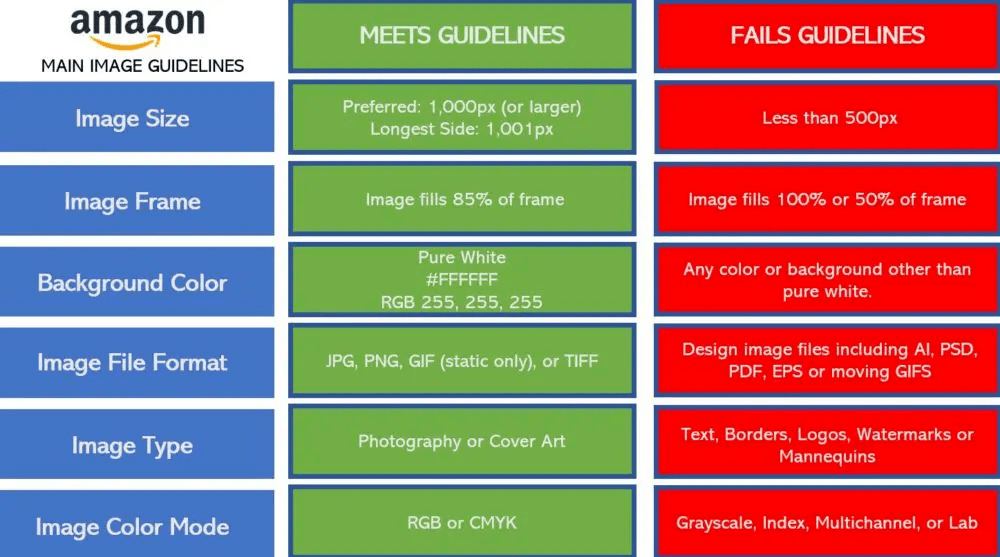
To prevent your listing from being "Search Suppressed" and to maximize conversions, your Amazon product images must adhere to three non-negotiable standards:
Why it matters: The human brain processes visual information in just 13 milliseconds. On a mobile-first platform like Amazon, failing to meet these requirements not only violates terms of service but instantly kills your click-through rate (CTR).
Navigating the complex landscape of product image requirements on Amazon is one of the most critical tasks for any e-commerce seller. As we move deeper into 2026, Amazon's automated compliance algorithms have become increasingly aggressive. A single pixel out of place or a background that is slightly off-white can trigger an immediate "Search Suppressed" status, effectively rendering your product invisible to millions of shoppers.
However, compliance is only half the battle. According to seller forum data, the human brain processes images in a staggering 13 milliseconds—60,000 times faster than text. Your main image is the single most important factor in determining your Click-Through Rate (CTR), which directly impacts your organic ranking and your Pay-Per-Click (PPC) advertising costs. High-quality, compliant images lower your effective Cost Per Click (CPC) by signaling to Amazon's A9 algorithm that your product is highly relevant to the search query.
This comprehensive manual breaks down the exact technical specifications, category-specific nuances, and advanced troubleshooting tactics you need to master Amazon product image requirements, fix suppressed listings, and leverage modern AI workflows safely.
Before you can worry about lighting, angles, or lifestyle settings, your image files must meet Amazon's strict technical backend requirements. Failing to adhere to these basic file specifications will result in upload errors before your images ever reach a customer's screen.
Amazon's systems are designed to process millions of images daily, and they require specific formats to ensure fast page load speeds across global servers. According to recent guidelines, the platform accepts four primary file types: JPEG (.jpg or .jpeg), TIFF (.tif), PNG (.png), and non-animated GIFs (.gif). However, not all accepted formats are created equal.
JPEG is universally preferred by Amazon. The compression algorithm used in JPEG files provides the best balance between high-resolution clarity and small file size, ensuring that your product pages load instantly on mobile devices. While TIFF files offer lossless quality and are excellent for your master photography archives, they create unnecessarily large files that can slow down upload times and occasionally trigger processing timeouts in Seller Central.
Color accuracy is a major driver of customer returns. If a customer orders a "navy blue" shirt based on your photo but receives a "royal blue" shirt, your return rate will spike, jeopardizing your account health. To prevent this, your images should be saved in the sRGB or CMYK color space. sRGB is the standard for web display and will ensure that the colors your photographer sees on their calibrated monitor match what the customer sees on their smartphone.
Furthermore, the base resolution of your image file must be a minimum of 72 dpi (dots per inch). While print photography often requires 300 dpi, web browsers render images at 72 dpi. Uploading a 300 dpi image won't make it look sharper on Amazon; it will only inflate the file size unnecessarily.
| File Format | Amazon Status | Best Use Case | Pros & Cons |
|---|---|---|---|
| JPEG (.jpg) | Highly Preferred | Standard listing uploads, main images, and A+ content. | Pros: Fast loading, optimal compression. Cons: Lossy format (loses quality if edited repeatedly). |
| PNG (.png) | Accepted | Infographics with text overlays or graphics requiring sharp edges. | Pros: Lossless, crisp text. Cons: Larger file sizes than JPEG. |
| TIFF (.tif) | Accepted | Master file storage; high-end luxury goods requiring maximum detail. | Pros: Uncompressed, highest quality. Cons: Massive file sizes, prone to upload timeouts. |
| GIF (.gif) | Accepted (Static Only) | Rarely recommended. | Pros: Small size. Cons: Limited color palette (256 colors), animated GIFs are strictly prohibited. |
One of the most common points of confusion for sellers is the difference between Amazon's "minimum" image size and the "optimal" image size. Understanding this distinction is crucial for activating one of Amazon's most powerful conversion tools: the hover-to-zoom feature.
According to industry standards, the absolute minimum dimension for an image to be accepted by Amazon is 500 pixels on its longest side. However, uploading an image of this size is a massive strategic error. Images under 1,000 pixels will display on the listing, but they will completely disable the zoom functionality. When customers cannot zoom in to inspect the texture of a fabric, the ports on an electronic device, or the ingredients on a supplement label, conversion rates plummet.
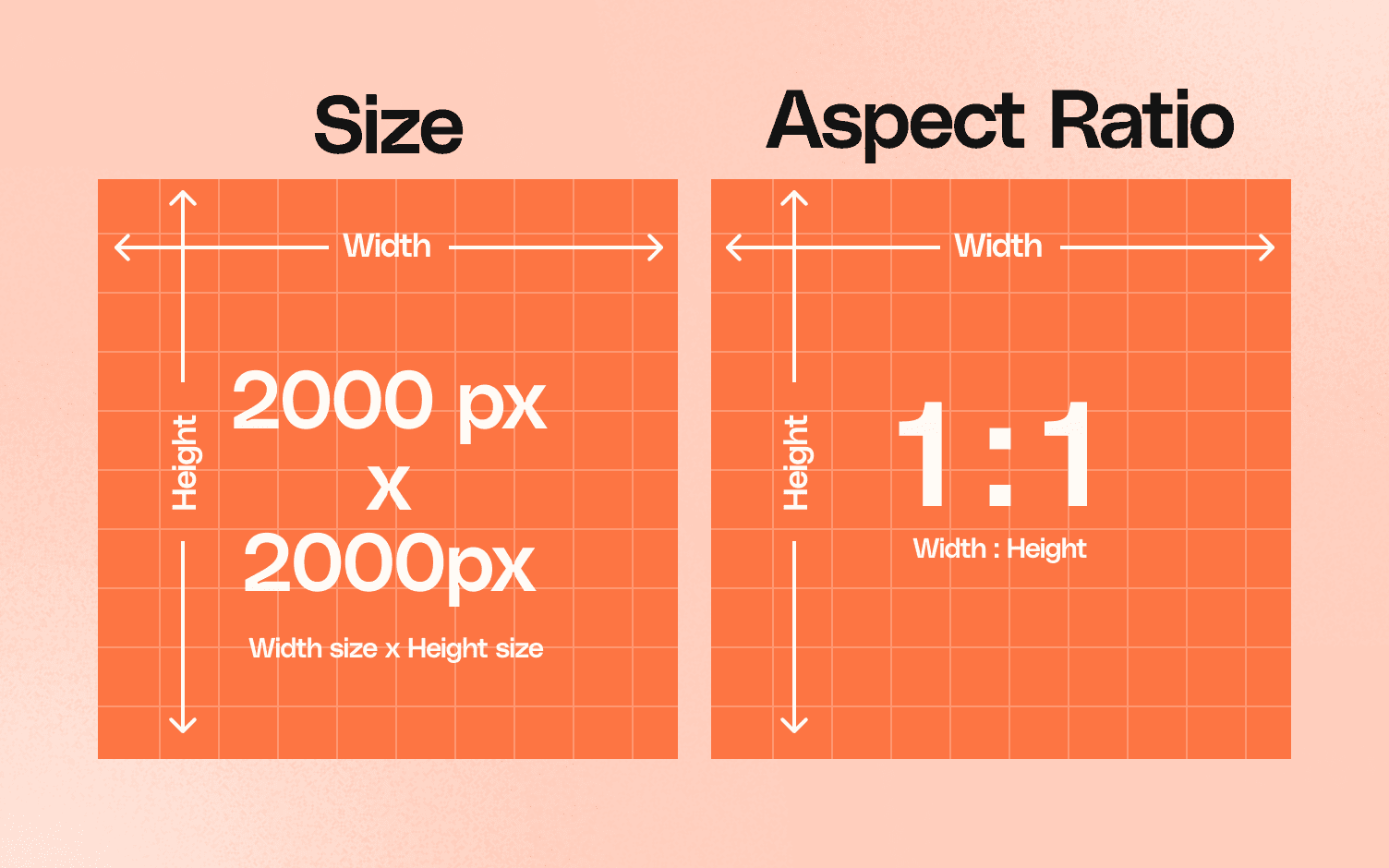
To activate the zoom feature, your image must be at least 1,000 pixels on its longest side. But simply meeting the minimum is rarely enough in a competitive marketplace. If you upload a 1,000px image, the zoom function will work, but the zoomed-in area may appear slightly pixelated or soft on modern high-definition displays.
The current recommended "sweet spot" for optimal zoom clarity without excessive file bloat is 1,600 pixels on the longest side. This dimension provides a crisp, detailed zoom experience on standard desktop monitors and mobile screens.
However, professional brands and top-tier agencies are increasingly adopting a future-proofing strategy. As 4K monitors and ultra-high-resolution smartphone screens (like Apple's Super Retina displays) become the norm, photography experts recommend sizing images between 2,000px and 3,000px on the longest side. This ensures your product looks flawless regardless of the device the customer is using.
Be aware that Amazon does impose a maximum dimension ceiling. Images cannot exceed 10,000 pixels on the longest side. Anything larger will be rejected by the system.
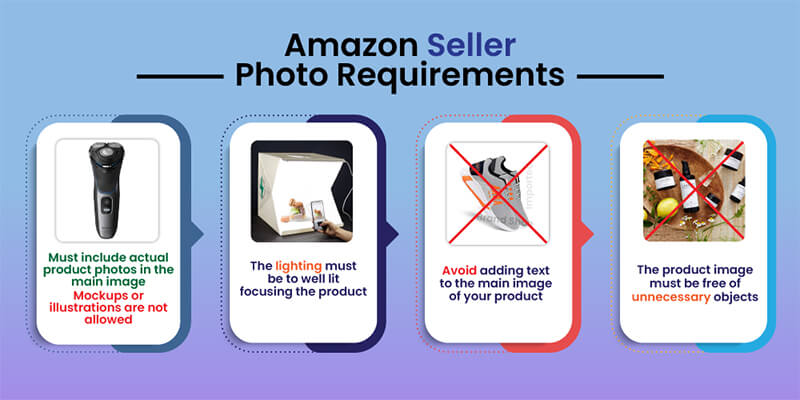
The Main Image (often called the "Hero" shot) is the most heavily regulated piece of real estate on Amazon. This is the image that appears in the search results, and it is the primary driver of your click-through rate. Amazon enforces strict uniformity for main images to ensure a clean, uncluttered shopping experience across the platform.
The most famous—and most strictly enforced—rule is the pure white background mandate. The background of your main image must be exactly RGB 255, 255, 255. It cannot be off-white, light gray, cream, or transparent. If your photographer shoots the product on a white seamless paper backdrop, the resulting raw image will likely be a light gray (around RGB 240) due to shadows and lighting falloff. The background must be digitally removed and replaced with a pure white hex code (#FFFFFF) in post-production.
Failure to use a pure white background is the number one cause of automated listing suppression. Amazon's bots constantly scan the catalog, and if they detect non-compliant background pixels, your listing will be hidden from search results until the image is replaced.
The second critical rule is that the product must fill at least 85% of the image frame. This rule exists to prevent sellers from uploading tiny products swimming in a sea of white space, which looks terrible on mobile devices.
To achieve this, crop the image as tightly as possible around the product without cutting off any edges. The product should dominate the visual space.
The 85% fill rule presents a significant challenge for sellers of long, narrow items—such as baseball bats, yoga mats, or fishing rods. If you place a long, thin item vertically or horizontally within a square frame, it is mathematically impossible for it to occupy 85% of the total area, often resulting in automated suppression.
To bypass this issue, utilize the Diagonal Framing Method. By rotating the product 45 degrees and running it diagonally from corner to corner within the square frame, you maximize the pixel coverage of the product, satisfying the algorithm's area requirements while maintaining a visually appealing presentation.
Amazon strictly prohibits any "marketing fluff" on the main image. According to official seller guidelines, your main image must NOT contain:
While the Main Image is locked down by strict regulations, Amazon relaxes the rules significantly for your secondary images. This is where your marketing strategy comes into play. Secondary images are your opportunity to sell the product, explain its features, and overcome customer objections.
Amazon allows you to upload up to nine images per listing. However, depending on the category and the user's device, only the first seven images typically display on the desktop product page without the user having to click to expand the gallery. Therefore, the "sweet spot" for most sellers is to upload exactly six high-impact secondary images (plus the main image, totaling seven).
When designing secondary images, you must adopt a mobile-first mindset. On the Amazon mobile app, the image carousel takes up the entire top half of the screen, while bullet points and descriptions are buried beneath the fold. For many mobile shoppers, your secondary images are the only part of the listing they will review before making a purchasing decision.
Because the rules are relaxed here, you should heavily utilize:
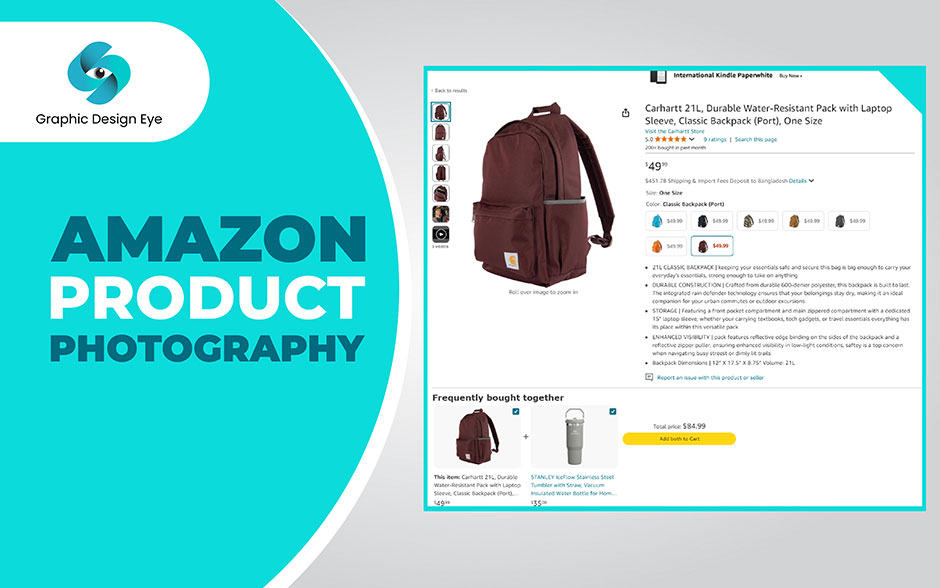
The landscape of e-commerce photography has been fundamentally altered by generative AI. Tools that can generate hyper-realistic lifestyle backgrounds or swap out environments in seconds are now widely available. However, using AI for Amazon listings requires a strategic approach to avoid violating terms of service or eroding customer trust.
According to data from advertising analytics, the cost and speed benefits of AI are undeniable. Traditional lifestyle photoshoots—requiring studio rentals, models, props, and professional photographers—typically cost between $200 and $1,500 per SKU and take 2 to 4 weeks to execute. In contrast, AI-generated lifestyle imagery costs between $5 and $50 per SKU and can be completed in a matter of hours.
Despite the cost savings, you should never use AI to generate your Main Image or to alter the physical appearance of the product itself. If an AI tool slightly alters the shape, color, or texture of your product, you will face a wave of "Item Not As Described" returns, which can lead to listing suspension.
Instead, use AI strategically for secondary images:
| Metric | Traditional Studio Shoot | AI-Enhanced Workflow |
|---|---|---|
| Average Cost per SKU | $200 – $1,500+ | $5 – $50 |
| Turnaround Time | 2 to 4 Weeks | 2 to 24 Hours |
| Flexibility | Low (Requires reshoots for new settings) | High (Infinite background variations) |
| Risk Level | Low (100% accurate to product) | Moderate (Risk of AI hallucinating product details) |
While the general rules apply across the board, Amazon enforces specific framing and presentation logic depending on the category you are selling in. A compliant image in the Electronics category might be rejected if applied to the Apparel category.
The clothing category is highly scrutinized. Main images for apparel must show the garment on a model or laid flat (invisible mannequin technique is highly preferred). The image must display the full garment—you cannot crop out the bottom of a dress or the sleeves of a shirt in the main image. Furthermore, the garment must be proportionally spaced, with equal white space at the top and bottom of the frame to ensure a uniform look across search results.
For small, high-detail items like rings, necklaces, and cosmetic jars, centering logic is paramount. The product must be perfectly dead-center in the frame. Because these items are small, sellers often try to zoom in too much, cutting off the edges of a necklace chain or the shadow of a ring. Amazon requires generous white space around jewelry to maintain a premium, uncluttered aesthetic.
Interestingly, electronics often benefit from a slight deviation from perfect centering. To convey depth and scale, professional electronics photography often utilizes the rule of thirds, positioning the item slightly off-center or at a slight 15-degree angle. This allows the camera to capture the front face and one side profile simultaneously, showing ports, buttons, or thickness, which is critical for technical buyers.
One of the most frustrating experiences for an Amazon seller is uploading a perfectly compliant, high-resolution image, only to find that the listing remains suppressed or the old image refuses to disappear. When this happens, you need to look beyond the basic rules and understand the backend architecture of Amazon's catalog system.
Seller Central often displays a message stating that image updates will take "up to 15 minutes" to reflect on the live site. In reality, this is a myth. If your image hasn't updated after 24 hours, you are likely facing a detail page control conflict. Even if you are the Brand Owner, another seller (or Amazon Retail itself) may have "locked" the listing contributions. To fix this, you must open a case with Seller Support, reference your Brand Registry status, and request that they "push" your image contributions live.
A recent issue plaguing sellers in 2026 is the "AI Overwrite" phenomenon. Amazon's internal AI systems continuously scan the catalog to optimize listings. Occasionally, the system will incorrectly flag a compliant new image and automatically revert the listing to an older, lower-quality image that the AI deems "safer." If you notice your images reverting, forum experts recommend deleting the image entirely from the backend, waiting 24 hours to clear the cache, and re-uploading the new file with a completely different file name.
If your US listing is suddenly "Search Suppressed" for image violations, but your US images are perfectly compliant, you may be the victim of a global marketplace attack. Because Amazon links ASINs globally, a bad actor or competitor can log into Amazon UK or Amazon Mexico, upload a non-compliant image (like a picture containing a massive red promotional badge) to your ASIN, and trigger a global suppression that takes down your US listing. You must check your global unified accounts to ensure no rogue images have been attached to your ASIN internationally.
When updating images via flat file (bulk upload) to force a system override, your file naming convention must be flawless. Do not name your files "front-view.jpg" or "product-final.jpg". You must use the specific syntax required by Amazon's database:
[Product Identifier].[Variant Code].[File Extension]B08XYZ1234.MAIN.jpg (For the primary hero image)B08XYZ1234.PT01.jpg (For the first secondary image)B08XYZ1234.PT02.jpg (For the second secondary image)B08XYZ1234.SWCH.jpg (For a color swatch image)
Mastering Amazon product image requirements is not just about avoiding algorithmic suppression; it is a direct lever for increasing your Click-Through Rate (CTR) and lowering your advertising costs. By treating your images as technical assets rather than just photographs, you secure a significant advantage over competitors.