How to Use a Secret Password Number for Phone Features and Better Security
*#06#) used to access hidden diagnostic menus on smartphones. Second, it represents mathematical PIN strategies (like the Add-X method) designed to secure devices against social engineering. Finally, it encompasses creative ciphers (like A1Z26 or pager slang) used to encode private messages. Understanding how to utilize all three categories allows you to unlock hidden device features while maintaining robust personal security.
What Are the Secret Codes for Android and iPhone?
Most smartphone users interact with their devices entirely through the graphical user interface, tapping app icons and navigating settings menus. However, beneath this polished exterior lies a secondary layer of interaction: the dialer. By entering specific sequences of numbers and symbols (primarily asterisks and hash signs), users can communicate directly with the device's modem, the operating system kernel, or the cellular network provider.
These sequences are broadly categorized into three types. USSD (Unstructured Supplementary Service Data) codes are quick codes designed for GSM networks to communicate with service providers in real-time. MMI (Man-Machine Interface) codes are manufacturer-specific strings built into the phone's firmware to test hardware components. Finally, SS (Supplementary Service) codes manage call forwarding and caller ID settings. According to official documentation and technical guides, these codes were originally designed for field technicians and network engineers, but many remain accessible to everyday users.
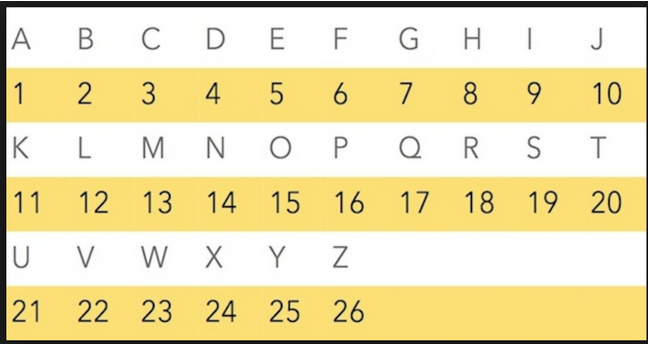
Image source: The Informaticists - WordPress.com
How to Find Your IMEI and EID with One Code
The most universally recognized secret password number across all mobile platforms is *#06#. When you type this sequence into your phone's dialer, you do not even need to press the call button; the device will immediately overlay a screen displaying its unique hardware identifiers.
Historically, this code only displayed the IMEI (International Mobile Equipment Identity), a 15-digit number used by cellular networks to identify valid devices. If a phone is stolen, reporting the IMEI to your carrier allows them to blacklist the device, rendering it useless on most networks worldwide. On modern devices manufactured in recent years, this same code now also reveals the EID (Embedded Identity Document). The EID is a 32-digit serial number required for activating an eSIM. As physical SIM cards are phased out, having quick access to your EID via this secret code is highly practical when switching carriers or setting up a new line of service.
How to Access Hidden Network Data in Field Test Mode
The graphical "signal bars" at the top of your screen provide a notoriously inaccurate representation of your actual cellular connection. A phone showing three bars might struggle to load a webpage, while another showing one bar might stream video flawlessly. To see the raw data, you need to access Field Test Mode.
On an iPhone, the secret code to enter this diagnostic area is *3001#12345#*. Once entered and the call button is pressed, the iOS interface shifts to a hidden dashboard. Here, you can navigate to the "Serving Cell Meas" section to view your signal strength measured in dBm (decibel-milliwatts). This is a negative number; a reading of -50 dBm indicates an exceptionally strong connection, while a reading approaching -120 dBm indicates a near-total dead zone. This data is invaluable when trying to position a cellular router or determine if a dropped call was due to hardware failure or network geography.
On Android devices, the equivalent diagnostic menu is typically accessed by dialing *#*#4636#*#*. This opens a "Testing" menu that provides deep insights into battery health, Wi-Fi API status, and detailed usage statistics that are otherwise hidden from the standard Android settings app.
Why Some Secret Codes Don't Work on Your Carrier
A common frustration when experimenting with these numbers is encountering an error message stating, "Connection problem or invalid MMI code." This does not necessarily mean you typed the code incorrectly. The functionality of a secret password number is heavily dependent on your specific cellular carrier and the firmware version installed on your device.
Carriers like Verizon and AT&T frequently disable specific USSD and MMI codes at the network level. They do this to prevent users from accidentally altering backend provisioning settings, which could disconnect the device from the cellular network and generate unnecessary customer support calls. Conversely, carriers like T-Mobile tend to leave more of these diagnostic codes open. Furthermore, Android manufacturers (like Samsung, Google, and Motorola) implement their own proprietary MMI codes that will not function on competing hardware. Therefore, while *#06# is universal, deeper diagnostic codes often require trial and error based on your specific hardware and network combination.
How to Create a Secure PIN Using the Add-X Method
Moving away from network diagnostics, the concept of a "secret password number" is most commonly associated with the PIN used to unlock devices, banking apps, and physical security systems. Despite decades of cybersecurity education, human psychology consistently drives users toward predictable numeric patterns. Creating a numeric password that is both mathematically secure and easily memorable requires a strategic approach rather than relying on raw memorization.
Why You Should Stop Using Common Number Sequences
The entropy—or inherent unpredictability—of a numeric PIN is naturally lower than that of an alphanumeric password. A standard 4-digit PIN only has 10,000 possible combinations. While modern smartphones utilize secure enclaves that lock out attackers after a few incorrect guesses, these defenses are useless if the attacker's first guess is correct.
According to global password analysis data, the sequence "123456" consistently ranks among the top most frequently used passwords worldwide, alongside variations like "111111" and "000000". Beyond these lazy sequences, the vast majority of users rely on significant dates: birth years (e.g., 1985), anniversaries (e.g., 0612), or the birthdays of their children. In the era of open-source intelligence (OSINT) and public social media profiles, these dates are not secret. An attacker who finds your lost phone can likely deduce your birth year or anniversary with a five-minute search of your public digital footprint.
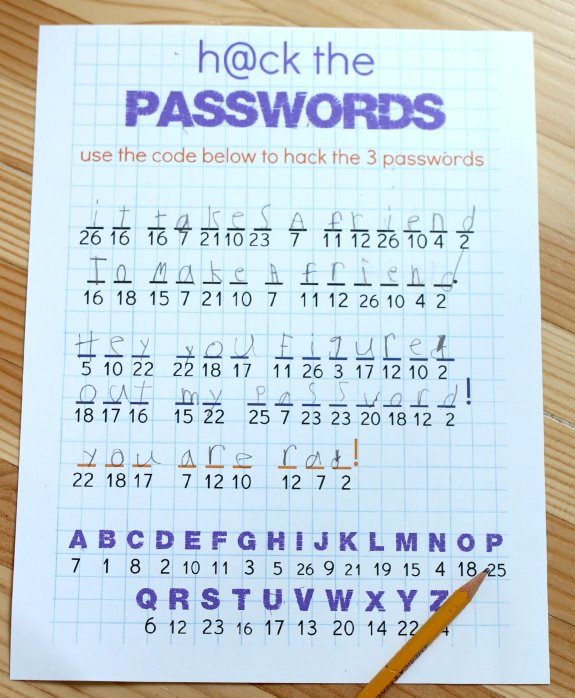
Image source: No Time for Flashcards
The Add-X Mathematical Strategy
To bridge the gap between security and memory, cybersecurity educators recommend the "Add-X" method. This technique allows you to base your secret password number on a familiar date, but obfuscates it through a simple mathematical rule that an attacker cannot guess.
Here is how the Add-X method works in practice:
- Select a Base Number: Choose a meaningful date that you will never forget. For example, your mother's birthday on March 14th (0314).
- Select a Modifier (The "X"): Choose a single digit between 1 and 9. Let's use 3.
- Apply the Math: Add the modifier to each individual digit of your base number.
- 0 + 3 = 3
- 3 + 3 = 6
- 1 + 3 = 4
- 4 + 3 = 7
- Your New PIN: The resulting secret number is 3647.
If the addition results in a two-digit number (e.g., 8 + 3 = 11), you simply drop the first digit and use the second (1). This mathematical obfuscation ensures that even if an attacker knows your mother's birthday, they will not be able to guess your PIN, because the modifier (+3) exists only in your mind. It transforms public data into a highly secure, high-entropy secret number.
How to Turn Poetry into a Secret Password Number
If you need a longer numeric sequence—perhaps for a master vault or a Wi-Fi router—you can utilize the "Poetic Password" generator method. This involves taking a line of poetry, a famous quote, or a song lyric, and converting it into a complex string of characters and numbers based on specific rules.
For example, take the famous Shakespearean line: "To be or not to be, that is the question." You can extract the first letter of each word, maintain the punctuation, and append the year the play was published (1603). The resulting string becomes: Tbontb,titq_1603. While this is an alphanumeric string rather than a pure number, it demonstrates how mnemonic devices can generate passwords with massive entropy. A computer attempting a brute-force attack sees this as a random string of 16 characters, which would take centuries to crack, yet the human user can recall it instantly just by reciting the poem.
What Is a 1Password Secret Key and Why Does It Matter?
In the realm of professional cryptography, a "secret number" takes on a much more rigorous definition. A prime example is the architecture used by modern password managers. When you create an account with 1Password, you are issued a "Secret Key"—a 34-character string of letters and numbers that acts as a secondary layer of encryption alongside your master password.
Based on their security documentation, this Secret Key provides 128 bits of entropy. Unlike a standard password, this secret number is never transmitted over the internet or stored on the company's servers. It remains locally on your device. When you log in, your master password and the Secret Key are combined using a Two-Secret Key Derivation Function (PBKDF2) to decrypt your vault locally. Because the Secret Key is mathematically massive and completely offline, it renders remote server breaches largely irrelevant; even if attackers steal the encrypted vault data from the cloud, they lack the local mathematical key required to open it.
How to Write Secret Messages Using Number Ciphers
Beyond network diagnostics and device security, secret password numbers have a rich history in creative communication. Long before digital encryption existed, individuals used numeric ciphers to hide the contents of their messages from prying eyes. Today, these methods are popular in journaling, puzzle-solving, and social messaging.
How the A1Z26 Substitution Cipher Works
The A1Z26 cipher is one of the oldest and most fundamental substitution ciphers in existence. The concept is entirely straightforward: each letter of the alphabet is replaced by its corresponding numerical position. 'A' becomes 1, 'B' becomes 2, 'C' becomes 3, all the way to 'Z' becoming 26.
Using this method, the word "SECURE" translates to the numeric sequence 19-5-3-21-18-5. While this cipher offers virtually zero security against a trained cryptographer or a computer algorithm, it is highly effective for casual privacy. It is frequently used by individuals who want to write private thoughts in a physical journal without worrying about a roommate or family member casually glancing at the page and reading the contents. The mental friction required to translate the numbers back into letters is usually enough to deter casual snooping.
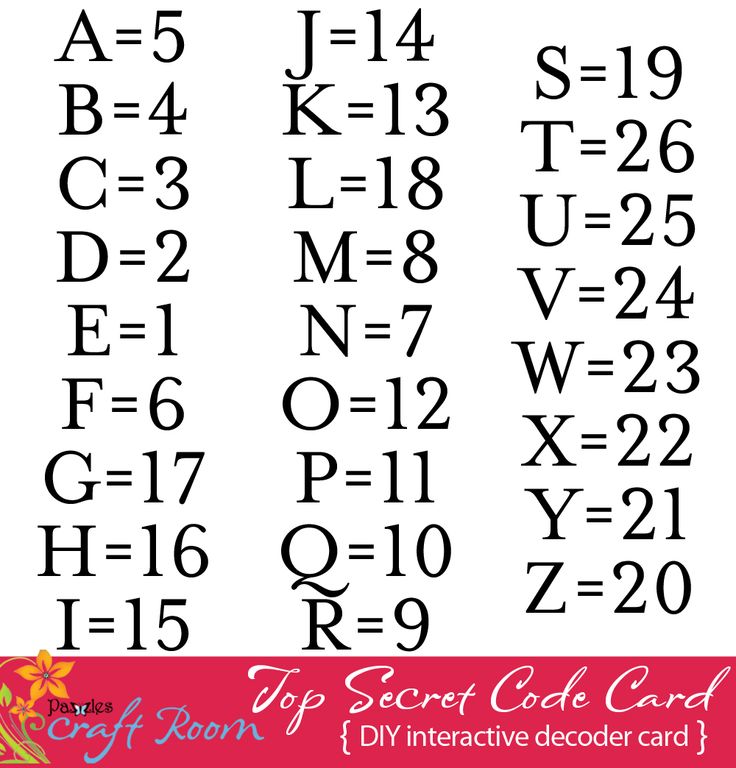
Image source: Pinterest
How to Use the Phone Keypad Cipher for Quick Notes
Another popular method for generating a secret password number is the Phone Keypad Cipher. This method leverages the physical layout of a standard telephone dial pad, where numbers 2 through 9 are associated with groups of three or four letters (e.g., 2 = ABC, 3 = DEF, 4 = GHI).
This cipher is particularly useful for creating memorable numeric PINs from words. If you want your ATM PIN to be the word "BIRD", you look at the keypad: B is 2, I is 4, R is 7, D is 3. Your numeric PIN becomes 2473. Alternatively, you can use this to write coded messages. Because multiple letters share the same number, decoding a keypad cipher requires context. The sequence 4-3-5-5-6 could spell "HELLO", but it could also technically spell "GDJJM". This inherent ambiguity adds a slight layer of complexity to the decoding process.
What Do Romantic Number Codes Like 143 and 831 Mean?
During the 1990s, before SMS text messaging became ubiquitous, communication was dominated by numeric pagers. Because these devices could only receive numbers, users developed an elaborate slang—a dictionary of secret numbers used to convey complex emotional messages. Many of these codes have survived into the modern era and are still used in social media bios and text messages.
- 143
- This is the most famous pager code, meaning "I Love You." It is derived from the number of letters in each word: I (1), Love (4), You (3).
- 831
- An alternative to 143, this code also means "I Love You." Its logic is slightly different: 8 letters, 3 words, 1 meaning.
- 07734
- A classic calculator spelling trick. When typed into a digital display and turned upside down, the numbers resemble the word "hELLO".
- 520
- A popular numeric code in Chinese internet slang. The pronunciation of the numbers 5-2-0 (wǔ èr líng) sounds phonetically similar to the phrase "I love you" in Mandarin (wǒ ài nǐ).
- 14643
- An expansion of the 143 code, this sequence translates to "I will always love you," based on the letter count of each word.
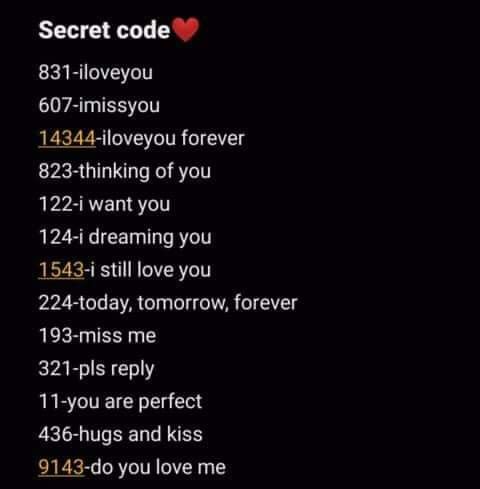
Image source: Pinterest
Can a Secret Code Actually Unlock Any Phone Password?
If you spend enough time on social media platforms like TikTok or YouTube, you will inevitably encounter viral videos claiming to reveal a "secret password number" that can bypass any smartphone lock screen. These videos typically show a user picking up a locked phone, opening the emergency dialer, typing a complex string of numbers and asterisks, and magically bypassing the PIN requirement to access the home screen.
From a technical standpoint, these claims are entirely false. Modern smartphone operating systems (both iOS and Android) utilize hardware-level encryption. The data on the device is encrypted using keys stored in a dedicated, isolated hardware component (such as Apple's Secure Enclave or Android's Titan M chip). The dialer application runs in the standard user space. It does not have the architectural authority to communicate with the secure enclave, nor can it command the kernel to drop the encryption keys.
While no code can bypass a lock screen to reveal your data, certain MMI codes can permanently delete it. For example, dialing
*2767*3855# on older Android devices triggers a hard factory reset, wiping the eMMC storage completely. Never enter unknown codes found on social media into your dialer.
The videos demonstrating these "hacks" are universally staged. They rely on clever video editing, hidden fingerprint scanners, or Face ID unlocking the device off-camera just as the user finishes typing the fake code. If you forget your device PIN, there is no secret USSD code that will save you. The only legitimate recovery method involves performing a hard factory reset via the device's recovery mode, which permanently destroys all local data to protect your privacy, allowing you to set up the phone as a new device.
Comparison of Secret Number Types
To summarize the different applications of numeric codes discussed in this article, the following table categorizes them by their primary purpose, risk level, and practical utility.
| Type of Secret Number | Primary Purpose | Example Format | Risk Level |
|---|---|---|---|
| USSD / Diagnostic Code | Accessing network data and hardware identifiers. | *#06# (IMEI Check) |
Low (Informational only) |
| Factory Reset Code | Wiping device data for resale or troubleshooting. | *#*#7780#*#* |
High (Data loss imminent) |
| Cryptographic Key | Local encryption of sensitive account data. | 34-character alphanumeric string | Critical (Do not share) |
| Obfuscated PIN | Securing lock screens against social engineering. | Base Date + Modifier (e.g., 3647) | Moderate (Depends on entropy) |
| Social / Pager Cipher | Creative communication and casual privacy. | 143, 831, A1Z26 sequences | None (For entertainment) |
Frequently Asked Questions
What is the secret code to see if my phone is being tapped?
There is no single code that definitively proves your phone is tapped by law enforcement or sophisticated spyware. However, dialing *#21# or *#67# will display your call forwarding status. If your calls, texts, or data are being forwarded to an unknown number without your permission, this code will reveal the destination number, which could indicate unauthorized access to your carrier account.
How do I find the hidden diagnostic menu on Android?
The most common universal code for Android's hidden testing menu is *#*#4636#*#*. This menu provides detailed statistics regarding your battery health, Wi-Fi connection, and app usage history. Keep in mind that some manufacturers, like Samsung, use their own proprietary codes (such as *#0*#) to access hardware testing screens for the display, vibration motor, and speakers.
What does the number 14643 mean in a text message?
In the context of pager slang and numeric text ciphers, 14643 translates to the phrase "I will always love you." The code is derived from the number of letters in each corresponding word: I (1), will (4), always (6), love (4), you (3). It is an extended version of the classic 143 code.
Is there a secret code to boost my internet or 5G speed?
No. While certain USSD codes can refresh your network connection or force your phone to drop a weak cell tower and search for a new one, there are no codes that can override your carrier's bandwidth limits or upgrade your device's hardware capabilities. Any online claim that a code will "double your 5G speed" is a myth.
How do I reset my forgotten phone password with a code?
You cannot bypass a forgotten lock screen password using a dialer code. Modern smartphones use hardware-level encryption that cannot be overridden by the phone app. If you are locked out, your only option is to boot the device into Recovery Mode (usually by holding specific physical volume and power buttons) and performing a factory reset, which will erase all data on the device.
Final Thoughts
Whether you are trying to diagnose a weak cellular signal, secure your banking apps, or send a coded message to a friend, understanding how to leverage secret password numbers gives you greater control over your digital life. Keep these core principles in mind:
- Record your identifiers: Dial
*#06#today and write down your IMEI and EID numbers in a physical notebook before your device is ever lost or stolen. - Ditch public dates: Stop using raw birthdays or anniversaries for your lock screen. Implement the Add-X method to mathematically obscure your PIN.
- Ignore viral unlock myths: Understand that no dialer code can bypass modern OS encryption; videos claiming otherwise are staged and potentially destructive.
- Use ciphers for fun, not security: Methods like A1Z26 and keypad mapping are excellent for casual privacy and journaling, but they will not stop a dedicated digital attack.
- Check your signal accurately: Use Field Test Mode (
*3001#12345#*on iOS) to read your connection in dBm rather than relying on inaccurate graphical bars.
Take five minutes right now to update your primary device PIN using a mathematical modifier to instantly upgrade your personal security.