How to Use RTPS Bihar to Apply for and Download Your Official Certificates Online
Securing official documentation in Bihar has transitioned from long queues at block offices to a fully digitized process. However, navigating the online portal can still present technical hurdles. Whether you are applying for a state-level job, seeking educational admissions, or applying for government subsidies, having valid Caste (Jati), Income (Aay), and Residence (Niwas) certificates is mandatory.
This comprehensive guide breaks down the technical nuances of the RTPS Bihar portal. We will explore how to bypass common server errors, understand the new Meri Pehchaan login protocol, and utilize specific strategies to ensure your application is approved without unnecessary delays.
What Is RTPS Bihar and How Does the ServicePlus Portal Work?
The foundation of Bihar's digital governance is rooted in the Bihar Right to Public Services (BRTPS) Act 2011. This legal framework was established to ensure that citizens receive notified public services within a strictly stipulated timeframe. If a designated public servant fails to provide the service within this period, they are subject to penalties, and the citizen has the right to appeal.
To facilitate this mandate, the state government, in collaboration with the National Informatics Centre (NIC), deployed the ServicePlus framework. This unified portal acts as the digital front door for the Bihar Prashasnik Sudhar Mission Society, allowing citizens to apply for, track, and download their documents from anywhere in the country.
Image source: Free Press Journal
The platform handles dozens of services, but the vast majority of traffic is driven by the "Big Three" certificates:
- Caste Certificate (Jati Praman Patra): Required for reservation benefits in education and employment.
- Income Certificate (Aay Praman Patra): Necessary for fee concessions, scholarships, and determining Non-Creamy Layer (NCL) status.
- Residential Certificate (Niwas Praman Patra): Serves as proof of domicile for state-specific schemes and local quotas.
"Under the BRTPS Act, the delivery of basic certificates like Caste, Income, and Residence is legally mandated to be completed within 10 to 15 working days by the Revenue Officer (RO) at the block level."
How to Register and Login Using the New Meri Pehchaan System
A significant advancement in the portal's architecture is the integration of Meri Pehchaan, the National Single Sign-On (NSSO) platform. In previous years, users created standalone accounts directly on the ServicePlus website. Today, the system requires centralized authentication to improve security and reduce duplicate accounts.
Many users encounter confusion during this transition. If you have an older ServicePlus account, you cannot simply log in with your old credentials directly on the main page. You must migrate your data to the new protocol.
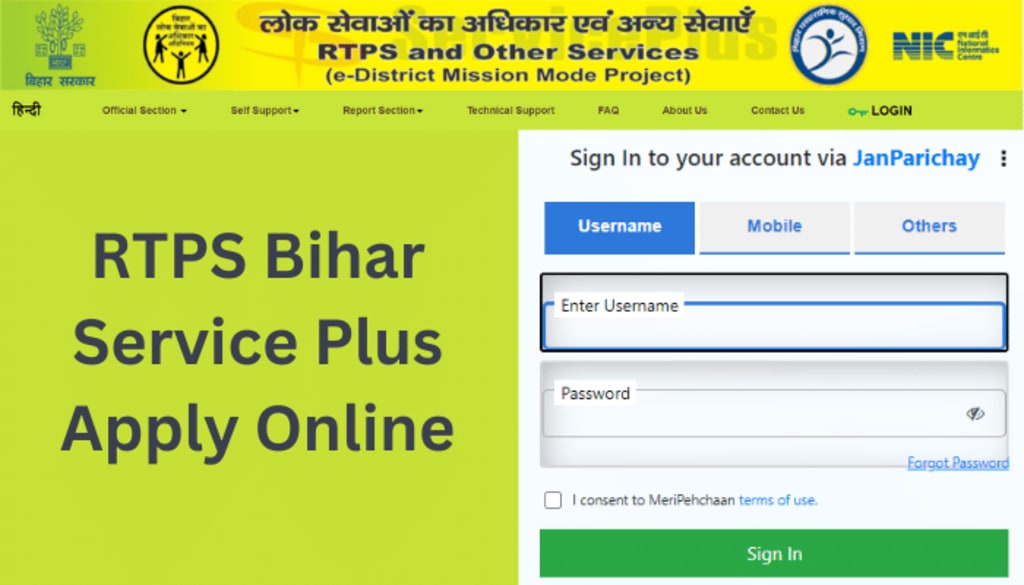
Image source: Vocal Media
Step-by-Step Registration for New Users
- Access the Portal: Navigate to the official ServicePlus Bihar website and click on the "Login" button at the top right corner.
- Redirect to Meri Pehchaan: You will be redirected to the Jan Parichay / Meri Pehchaan authentication gateway.
- Initiate Sign Up: Click on "Sign up for Meri Pehchaan" at the bottom of the login box.
- Verify Mobile Number: Enter your active mobile number and generate an OTP. This number will be permanently linked to your application status updates.
- Complete Profile: Fill in your First Name, Last Name, Date of Birth, and Gender. You will also be prompted to create a unique username and a strong password.
- DigiLocker Integration (Optional but Recommended): You can consent to link your account with DigiLocker, which allows the portal to automatically fetch verified documents like your Aadhaar card in future applications.
For existing users, log in using your old ServicePlus username and password through the specific "ServicePlus User" tab on the Meri Pehchaan screen. The system will prompt you to link your legacy account to a new NSSO profile via OTP verification.
Which RTPS Server Should You Use Between RTPS 1 2 3 and 4?
One of the most frequent search queries is "rtps rtps bihar" or specific variations like "rtps 3 bihar." This stems from a common technical challenge: the primary portal frequently experiences heavy traffic, leading to slow load times or complete unresponsiveness.
To manage this massive load, the National Informatics Centre utilizes mirror servers. RTPS 1, RTPS 2, RTPS 3, and RTPS 4 are identical copies of the same database. They exist solely for load balancing. Submitting an application on Server 4 is exactly the same as submitting it on Server 1; all data feeds into the central ServicePlus repository.
Image source: RTPS Bihar
The URL Modification Strategy
If you click a link to `rtps3.bihar.gov.in` and the page fails to load, you do not need to wait for it to come back online. You can manually edit the address bar in your browser. Simply change the number in the URL to another server (e.g., change `rtps3` to `rtps1` or `rtps4`). According to various community tracking hubs, Server 4 and Server 2 often handle overflow traffic more efficiently during peak daytime hours.
How to Fix Common RTPS Bihar Website Errors and Session Timeouts
Even on a functioning mirror server, users frequently report encountering a "Session Expired" error right as they attempt to submit their final form or during the Aadhaar OTP verification stage. This is incredibly frustrating, as it forces you to start the application from scratch.
Based on extensive feedback from local community forums and troubleshooting threads, here are highly effective strategies to bypass these technical roadblocks:
The ServicePlus servers experience their highest load between 10:00 AM and 4:00 PM when block offices are actively processing applications. An optimal time to apply is early morning (between 5:00 AM and 7:00 AM) or late at night (after 11:00 PM). During these windows, server response times are significantly faster, and OTP delivery is nearly instantaneous.
Browser Optimization and the Fast-Fill Method
- Always Use Incognito/Private Mode: The RTPS portal is highly sensitive to cached data and old session cookies. Opening the site in an Incognito window ensures a clean session, drastically reducing the chances of a timeout error.
- Prepare Documents in Advance: The portal has strict file size limits (usually under 200KB for photos and under 1MB for PDFs). Compress your passport photo and Aadhaar scan before you even log in. Attempting to compress files while the application window is open will likely result in a session timeout.
- Utilize the "Initial Preview" Stage: Fill out the text fields as rapidly as possible. Once you hit "Submit" on the first page, you enter the "Initial Preview" stage. At this point, your text data is temporarily saved to the server session. You can take your time reviewing the details here before proceeding to the document upload screen.
Step-by-Step Instructions to Apply for Caste Income and Residence Certificates
Once you have successfully logged into the Meri Pehchaan dashboard, navigate to the left-hand menu and click on "Apply for Services" followed by "View all available services." You can use the search bar to find specific documents (e.g., typing "Issuance of Caste Certificate at RO level").
Image source: service-plusbihar.com
Required Document Checklist
For standard applications at the Revenue Officer (RO) level, you will typically need:
- A valid Aadhaar Card (preferably linked to your mobile number for e-KYC).
- A recent passport-sized photograph (JPEG format).
- A self-declaration form (available for download on the portal).
- For specific cases (like Tatkal services or age verification), additional documents like a Voter ID or Ration Card may be requested.
Crucial Rules for Specific Certificates
The "Father’s Side Rule" for Women: A common reason for the rejection of a married woman's Caste Certificate is applying from her husband's residential address. According to Bihar government guidelines, a person's caste is determined by birth, not marriage. Therefore, married women must apply for their Caste Certificate based on their father's permanent address and caste details, not their husband's.
The NCL (Non-Creamy Layer) Shortcut: If you are applying for state-level government jobs, you need an NCL certificate. If you already have an older NCL certificate, you do not always need to undergo a full re-verification process. As noted by employment resource portals, you can often submit a "Self-declaration" (Undertaking) form along with your expired NCL certificate to expedite the renewal process.
Understanding Certificate Validity Periods
Not all certificates are permanent. It is vital to understand when you need to reapply:
| Certificate Type | Validity Period | Renewal Requirement |
|---|---|---|
| Caste Certificate (Jati) | Permanent No Expiry | Does not require renewal unless administrative boundaries change. |
| Income Certificate (Aay) | 1 Year Expires | Must be renewed annually from the date of issuance. |
| Residence (Permanent) | Permanent No Expiry | Valid indefinitely for permanent domiciles. |
| Residence (Temporary) | 1 Year Expires | Requires renewal; often used by students or temporary workers. |
How to Track Your Application Status and Download the Final Certificate
After submitting your application, you will receive an acknowledgment slip containing an Application Reference Number (e.g., BCC/2026/1234567). This number is your key to tracking the document.

Image source: Vocal Media
Tracking Without Logging In
You do not need to log into Meri Pehchaan to check your status. On the main RTPS homepage, click on the "Track Application Status" link under the Citizen Section. Enter your Application Reference Number and either the application submission date or the expected delivery date. The system will display the current stage of your file (e.g., "Under Process at RO Level" or "Delivered").
The 24-Hour Download Rule
When your status changes to "Delivered" or "Executed," a download link will appear. However, many users report downloading a blank PDF or a certificate missing the digital signature. This occurs because the digital signature takes time to sync across the servers. It is highly recommended to wait at least 24 hours after the status shows as "Delivered" before downloading the final PDF.
To verify the authenticity of a downloaded document, you can use the Certificate Web Copy verification tool provided by the RTPS digital download server. Entering your certificate number here will confirm if the digital signature is valid and recognized by the state database.
What to Do if Your Application Is Delayed or Rejected
While the system is designed for efficiency, applications can be delayed due to high volume or rejected for technical reasons. The statutory limit for most RO-level certificates is 10 to 15 working days. If this time elapses and your status remains "Under Process," you have legal recourse.
The Appeals Process
- The First Appeal: If the designated officer (usually the Circle Officer or Revenue Officer) fails to deliver the service within the stipulated time, or if your application is rejected without valid grounds, you can file a First Appeal. This must be done within 30 days of the rejection or the expiry of the time limit. The appeal is escalated to the Sub-Divisional Officer (SDO).
- The Second Appeal: If the First Appellate Authority fails to resolve the issue within their mandated timeframe, you can file a Second Appeal to the Reviewing Authority (often at the District Magistrate level).
Common Reasons for Rejection
To avoid the appeals process entirely, ensure you do not make these common mistakes:
- Name Mismatch: The name on your application form must match the English and Hindi spelling on your Aadhaar card exactly.
- Blurry Documents: If the uploaded self-declaration form or Aadhaar scan is illegible due to over-compression, the RO will reject it.
- Wrong Jurisdiction: Applying to the wrong Block or Anchal. Ensure you select the exact block where your permanent residence is registered.
Special Services for Bihari Citizens Living in Delhi and NCR
A significant portion of Bihar's population resides in the National Capital Region (NCR) for work or education. Returning to a home district in Bihar simply to verify documents for a Caste or Income certificate is impractical.
To address this, the government established a dedicated loophole: the Bihar Lok Sewa Kendra located at Bihar Bhawan in Chanakyapuri, New Delhi. Citizens residing in Delhi can apply for their certificates online through the standard RTPS portal but can coordinate physical verification and collection through this specific center.
According to the official Bihar Bhawan administration, they offer specialized support for NCR residents. They even operate a dedicated WhatsApp Helpline (+91 8130461135) specifically for status inquiries related to applications processed through the Delhi center. This is a highly effective resource if you are an out-of-state applicant facing verification delays.
Frequently Asked Questions
Is the RTPS Bihar certificate free of cost?
Why is the RTPS Bihar website not opening?
How can I track my application status if I lost my Application ID?
Can I apply for a Bihar Caste Certificate if I live in another state?
What is the difference between RO, SDO, and DM level certificates?
How do I update my mobile number in RTPS Bihar?
Final Checklist for a Successful RTPS Bihar Application
Navigating government portals requires patience and attention to detail. By understanding the technical quirks of the ServicePlus system and preparing your documents correctly, you can secure your official certificates with minimal friction.
Key Takeaways for a Smooth Application Process:
- Use Incognito Mode: Always apply using a private browsing window to prevent session timeout errors caused by old cache data.
- Time Your Application: Submit your forms early in the morning (before 7:00 AM) to avoid peak server congestion and ensure rapid OTP delivery.
- Check Validity: Remember that Income certificates expire after 12 months, while Caste and Permanent Residence certificates hold permanent validity.
- Apply Correctly (For Women): Married women must apply for Caste certificates using their father's details and address, not their husband's.
- Wait to Download: Allow 24 hours after your status changes to "Delivered" before downloading the PDF to ensure the digital signature is fully synced.
- Use the Appeal System: Do not hesitate to file a First Appeal online if your application exceeds the 15-day statutory processing limit.