How to Use the My Silversea Portal to Manage Your Luxury Cruise Booking
The My Silversea portal is the central digital hub for managing your upcoming voyage. By logging into my.silversea.com, passengers can submit mandatory guest information, book shore excursions, secure specialty dining reservations, and download final cruise documents. Completing your profile early is highly recommended to ensure smooth boarding and secure preferred activity times.
Preparing for a luxury cruise involves more than just packing your bags. Long before you step aboard, the logistical foundation of your voyage is managed through a dedicated online system. For passengers sailing with this renowned cruise line, that system is the My Silversea portal.
While the prospect of navigating over 900 global destinations is exciting, the administrative side of cruise preparation can sometimes present technical hurdles. From securing a table at La Dame to ensuring your passport details are correctly logged for international customs, the portal serves as your primary tool. This comprehensive overview will walk you through the registration process, detail the strategies for booking high-demand excursions, and provide actionable solutions for common technical glitches, such as the frequently reported "missing booking" error.
Image source: www.silversea.com
How to Register and Log In to Your My Silversea Account
Accessing your booking requires a registered account tied directly to the email address associated with your reservation. The process is straightforward for most users, but specific nuances exist depending on how your voyage was booked.
To begin, navigate to the official My Silversea Login page. If you are a returning guest (a member of the Venetian Society) or have sailed recently, you likely already have an account. You can log in using your established email and password.
For first-time users, the registration process requires you to create a new profile. You will need to provide your first name, last name, email address, and a secure password. It is critical that the email address you use to register matches the exact email address your travel agent or the cruise line has on file for your booking. If these do not match, the system will not automatically link your upcoming voyage to your new account.
123qweASD) for their initial login. If you are traveling with a corporate group, check your welcome documentation before attempting to reset your password.
If you forget your password, the portal offers a standard "Forgot Password" link. Clicking this will prompt you to enter your email address, and a reset link will be sent to your inbox. Some users report a slight delay in receiving this email, so it is advisable to check your spam folder and wait at least fifteen minutes before requesting a second reset link to avoid invalidating the first one.
What Can You Do Inside the My Silversea Portal?
Once successfully logged in, you are greeted by the main dashboard. This interface is divided into several key areas designed to help you prepare for your trip. The primary sections include "My Voyages," where your upcoming sailings are listed; "My Profile," where you manage your personal contact and loyalty information; and "Saved Journeys," which acts as a wishlist for future itineraries you may be considering.
If you have multiple upcoming cruises booked, the portal allows you to toggle between them. Each voyage operates as an independent module within the dashboard, meaning you must manage the guest information, dining, and excursions for each sailing separately.
Image source: YouTube
How to Book Specialty Dining and Shore Excursions
One of the most anticipated aspects of luxury cruising is the culinary experience. Silversea ships, which range in capacity from 51 to 364 suites according to official fleet data, offer multiple dining venues. Managing these reservations pre-cruise is a major function of the portal.
When booking dining, you will typically find three standard time slots available: Early (usually around 7:00 PM), Regular (around 8:00 PM), and Late (around 9:00 PM). Availability is dynamic and updates in real-time as other passengers make their selections.
It is important to understand the distinction between venues that require reservations and those that operate on an open-seating basis. Furthermore, while most dining is included in your fare, specific specialty restaurants carry an additional fee.
| Dining Venue | Reservation Required? | Additional Fee | Seating Style |
|---|---|---|---|
| The Restaurant | No (Encouraged for large groups) | $0 | Open Seating |
| La Dame | Yes (Highly Recommended) | $60 per person | Formal / Reserved |
| La Terrazza | Yes (For Dinner) | $0 | Interactive / Buffet by day |
| The Grill (Hot Rocks) | Yes (For Dinner) | $0 | Poolside / Casual |
When making a dining reservation, the portal allows you to link other passengers to your table. You can add up to seven additional guests, making a maximum table size of eight. However, there is a known quirk in the system: when you link other guests to your reservation, that booking will only appear in your portal. The linked guests will not see the reservation reflected in their own My Silversea accounts. You must communicate the reservation details to them manually.
For shore excursions, the portal provides a detailed catalog of available tours for each port of call. High-demand excursions can fill up quickly. If your preferred tour is full, the portal offers a waitlist function. A highly recommended strategy is to place yourself on the waitlist for your first choice, and then immediately book a "backup" excursion for the same day. If the waitlist clears, the system will notify you; if it does not, your backup option remains secure.
Completing Your Guest Information for Final Documents
Perhaps the most critical administrative function of the portal is the completion of your Guest Information. Cruise lines are legally required to collect specific data before allowing passengers to board. Failure to complete this section will prevent the release of your final cruise documents and luggage tags.
The portal utilizes a visual tracking system to indicate your progress. You must achieve a "Green Check Mark" next to every mandatory sub-section to be considered "Voyage Ready."
Verify your name exactly as it appears on your passport, along with your date of birth and contact information.
Input your passport number, issue date, and expiration date. Ensure your passport is valid for at least six months beyond the end date of your voyage. You must also confirm any necessary visa arrangements.
Provide the name and phone number of a contact person who is not traveling with you on the ship.
Read and digitally accept the cruise line's terms and conditions. This is a mandatory legal requirement.
Once all sections display the green check mark, and your final payment has been processed, your cruise documents will become available for download—typically 30 to 50 days prior to departure. Note that the portal locks for modifications 72 hours before your sailing date. Any changes required after this three-day cutoff must be handled in person at the pier or onboard with the guest relations desk.
Why Is My Booking Missing from My Silversea?
One of the most common frustrations reported by passengers is logging into the portal only to find that their upcoming voyage is nowhere to be found. The dashboard simply states that there are no current bookings associated with the account.
In the vast majority of cases, this is not a cancellation or a payment error; it is a database issue known as the "duplicate profile glitch."
The reservation system relies on exact data matching. If your travel agent booked your cruise using a slightly different variation of your name (e.g., "Robert" vs. "Bob"), or if they used their agency email address instead of your personal email address, the system creates a new, isolated profile for that specific booking. Because your My Silversea login is tied to your personal email, the portal cannot "see" the booking that is floating in the system under the agency's email or the alternate name spelling.
Once the reservation department merges the profiles on their backend, the missing voyage will typically populate in your dashboard within 24 hours.
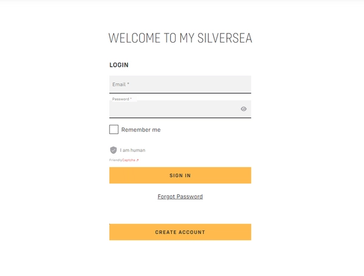
Image source: Silversea
Troubleshooting Common My Silversea Technical Errors
Even when your booking is properly linked, you may encounter technical friction while navigating the site. The portal is a complex web application that handles secure data, and it is sensitive to certain browser configurations.
If you attempt to log in and are immediately met with a blank screen or a "Page Not Found" error, the most likely culprit is your browser's JavaScript settings. The My Silversea portal requires JavaScript to be enabled to function correctly. If you are using strict privacy extensions or ad-blockers, they may inadvertently block the scripts required to load the dashboard. Temporarily disabling these extensions for the silversea.com domain often resolves the issue.
Browser choice also plays a significant role in portal stability. Based on passenger feedback and technical support recommendations, Google Chrome and Apple Safari are the most reliable browsers for interacting with the site. Users attempting to upload passport photos or download large PDF documents frequently report timeout errors when using older versions of Microsoft Edge or Mozilla Firefox.
Furthermore, while the website is responsive, device compatibility matters when completing mandatory forms. Attempting to fill out the detailed Guest Information section on a smartphone browser can be frustrating due to the volume of data entry required. For the initial setup—especially the submission of passport details and the acceptance of the passage contract—using a desktop or laptop computer is a highly recommended approach. It minimizes the risk of session timeouts and ensures that all required fields are easily visible.
If you find yourself stuck in a "login loop" (where entering your credentials simply refreshes the login page without granting access), clearing your browser's cache and cookies is the standard fix. In Chrome, this can be done by navigating to Settings > Privacy and Security > Clear browsing data, and selecting "Cookies and other site data."
Should You Use the My Silversea App or the Web Portal?
As mobile technology has become ubiquitous in travel, many passengers naturally search for a dedicated mobile application to manage their cruise. While an app does exist, understanding the functional differences between the mobile app and the desktop web portal is crucial for managing expectations.
The web portal and the mobile app serve two distinct phases of your journey. Attempting to use the app for heavy pre-cruise administration often leads to frustration, as the app is primarily optimized for the onboard experience rather than pre-departure data entry.
Best Used For: Pre-Cruise Preparation
The desktop website (my.silversea.com) is the robust, secure environment designed for heavy administrative tasks. It is the platform you should use to input passport data, acknowledge legal contracts, and download your final printable cruise documents. It offers the most stable interface for browsing the full catalog of shore excursions and managing complex dining reservations with linked guests.
Best Used For: Onboard Navigation
The mobile app shines once you step aboard the ship and connect to the onboard Wi-Fi. It is designed to replace the printed daily program, allowing you to view the daily schedule of events, check restaurant opening hours, and review your onboard folio (spending account). While it has some pre-cruise functionality, users frequently report that it is less stable than the website for uploading secure documents.
For a seamless experience, the most effective method is to complete all your pre-cruise requirements (the "Green Check Marks") using the web portal on a computer. Then, download the mobile app to your smartphone a few days before departure, logging in so it is ready to use the moment you board the vessel.
Frequently Asked Questions
Final Tips for a Smooth Experience
Navigating the digital side of your luxury cruise doesn't have to be stressful. By understanding the portal's requirements and limitations, you can ensure your documentation is perfectly in order long before you reach the port. Keep these core strategies in mind as you prepare for your voyage:
- Log in early: Access the portal at least 90 days prior to departure to secure the most desirable dining times and high-demand shore excursions.
- Chase the green marks: Do not consider your pre-cruise prep complete until every sub-section in the Guest Information tab displays a green check mark.
- Use a desktop browser: For entering passport details and accepting legal contracts, a desktop computer running Chrome or Safari offers a significantly more stable experience than a mobile device.
- Verify your email: If your booking is missing, immediately contact your travel agent to ensure they linked the reservation to your exact personal email address, not their agency address.
- Have a backup plan: Always utilize the waitlist feature for sold-out excursions, but secure a secondary tour for the same day to guarantee you have an activity planned.